
An SEO migration checklist is your primary defense against traffic loss during one of the highest-risk events in organic search: a website migration. Whether you’re replatforming your CMS, restructuring your URL hierarchy, or moving to a new domain, skipping a structured checklist means trading recoverable risk for unplanned ranking erosion.
Drops rarely happen at launch. Google typically takes three to four weeks to reprocess crawled changes at scale, meaning errors introduced during the move don’t surface in Search Console until well after launch — when they’re harder to trace and fix.
Baseline first. Export 12 months of Search Console data before touching anything. You can’t measure recovery without it. Redirects are non-negotiable. Every old URL needs a 301 redirect to its new location. Missing even a handful means lost link equity — permanently. Metadata doesn’t migrate itself. Page titles, descriptions, and structured data must be rebuilt and verified on the new platform before launch. robots.txt can silently kill your site. One misconfigured file can deindex everything. Check it the moment you ship. The 28-day window is real. Core Web Vitals and crawl data take up to a month to stabilize — problems caught on staging disappear, problems caught after launch don’t. AI search adds a new risk. AI crawlers don’t render JavaScript. If your website migration moves to a headless setup, ensure key content pages use server-side rendering.
Get the fundamentals of SEO right across all three phases: before, during, and after migration, and a website migration becomes an opportunity, not a setback.
Why Do You Need a detailed SEO Migration Checklist?
Switching CMS platforms is one of the highest-risk things you can do to a website’s search performance. If you migrate from a legacy monolithic CMS to a modern headless setup, or from an expensive SaaS platform to a self-hosted alternative: the SEO risk is the same. Not because the migration process is technically hard, but because the damage is invisible until it isn’t. That’s why running through an SEO migration checklist before you flip the switch matters more than most teams realize.
Website rankings don’t drop in a moment. Your positions drop three-four weeks later, when Google finishes reprocessing what has changed.
We’ll show three main phases: what to measure before you touch anything, what breaks SEO silently during the migration, and what to watch for in the 28 days after you ship.
Search engines spend years building a picture of your website: which pages exist, what they’re about, how they relate to each other, how fast they load. That accumulated understanding drives your rankings.
When you migrate a site from one CMS to another, you ask search engines to rebuild that picture from scratch. If the signals they relied on (your URLs, your page structure, your metadata) have changed or disappeared, rankings drop while they recalibrate. For many sites, that recalibration takes weeks. For some, months.
The part that’s easy to get wrong: the damage often isn’t visible right away. A page that silently lost its metadata, a redirect that wasn’t quite mapped correctly, a configuration file carried over from the staging environment, none of these look like errors. The site works. Users can navigate. But search engines are receiving different signals than they were before, and rankings respond to that eventually.
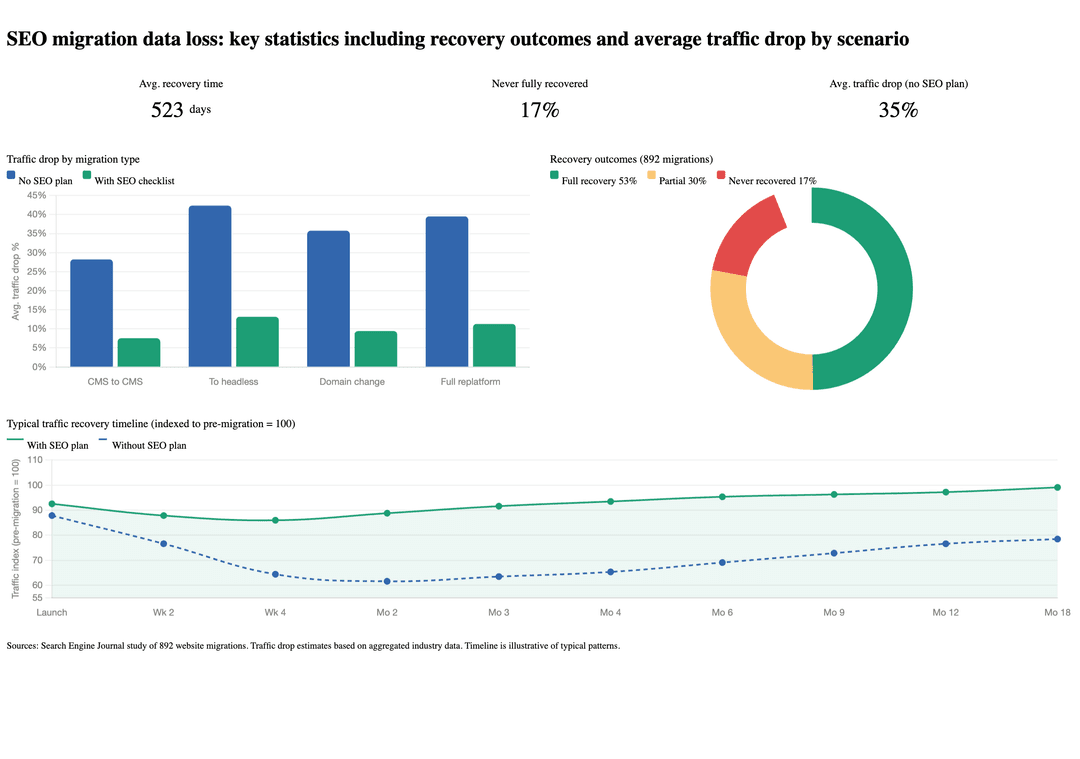
A study of 892 website migrations found average recovery time, when SEO wasn’t treated as a technical priority, was 523 days. Nearly 17% of sites never recovered to pre-migration levels.
Most of this is preventable. It requires treating SEO as part of the migration plan from day one, not a QA step at the end.
If you’re planning a CMS migration and want to understand what a well-run project looks like end to end.
Phase 1: Before you migrate, establish your baseline
The most important thing you can do before touching a single file is document where you stand today. Without a stepwise SEO migration strategy, you have no way of knowing whether the website migration helped, hurt, or left things unchanged.
Capture your current rankings and traffic
Export everything carefully, at least 12 months of data from Google Search Console and Bing Webmaster Tools: which pages receive clicks and impressions, which queries drive traffic, where your pages rank on average. Do the same from your analytics platform for organic sessions and conversions.
These numbers are your benchmark. After you ship, any significant deviation is worth investigating. A 10-15% temporary dip is normal. A sustained 30% drop means something went wrong.
Save every URL on your current site
Before anything changes, get a complete list of every URL currently indexed by Google. Blog posts, product pages, category pages, landing pages, everything.
SEO checklist becomes the foundation for your redirect map: the document that ensures every old URL points to the right new location after migration. There’s no way to redirect what you haven’t catalogued.
In our experience, skipping this step is one of the most consistent patterns in migrations that struggle to recover.
Pay particular attention to URL parameters. Legacy systems often use query parameters, things like ?category=shoes or ?page=2. If the new platform names those parameters differently, every old indexed URL becomes a dead end. It’s quiet, easy to miss in testing, and genuinely destructive to rankings.
Document your current SEO setup
Take stock of everything currently configured for SEO: page titles and descriptions, any structured data markup (the code that enables rich results like star ratings or FAQ dropdowns in search), and how your pages link to each other. If your site targets multiple languages or regions, document how that’s handled.
None of this transfers automatically to a new platform. It needs to be deliberately rebuilt, and you can only do that if you know what was there in the first place.
Phase 2: During migration, what breaks silently
This is where the real risk lives. The issues below don’t produce error messages. The site keeps working. But they change how search engines understand and rank your content, and the effects compound.
| Element | What breaks | Why it’s invisible | Fix |
|---|---|---|---|
| Redirects | Page authority disappears | Site navigates normally, no errors shown | Map every old URL before migration; verify 301s post-launch |
| Metadata | Titles and descriptions missing or empty | Pages render correctly for users | Verify both CMS fields and frontend rendering layer independently |
| Canonical tags | Authority split across duplicate URLs, or full deindexation | No visible symptom until rankings drop | Ensure canonicals point to live domain, not staging, before ship |
| Structured data | Rich results (stars, FAQs, cards) stop appearing | Page looks identical before and after | Rebuild markup in new templates; validate with Google’s Rich Results Test |
| robots.txt | Entire site removed from search index | Site fully accessible to users | Check file immediately post-deploy; name a responsible person |
| HTML structure | Search engines misread page topic and hierarchy | Page appears visually unchanged | Audit H1–H3 order in new templates against pre-migration baseline |
| URL parameters | Old indexed URLs become dead ends | New platform silently renames parameters | Document all legacy parameters; include in redirect map |
The last two rows, HTML structure and URL parameters, are worth adding because both are called out specifically in the article and are genuinely underappreciated failure points. The URL parameters one in particular is flagged as “quiet, easy to miss in testing, and genuinely destructive” it earns a row.
Redirects: the highest-stakes item
When URLs change during a migration, and they almost always do, redirects are how you tell search engines: this page moved, here’s where it lives now. A permanent redirect (301) transfers the page’s accumulated authority to the new URL.
Missing or incorrect redirects are the single most common cause of post-migration ranking loss. If an old URL returns an error instead of redirecting, the authority it built up over years effectively disappears.
Every URL on your old site needs either a redirect to its new location, or a deliberate decision to retire it. There’s no safe middle ground.
Metadata: titles, descriptions, and more
Page titles and meta descriptions live in the code that wraps it. When you move to a new platform, that code gets rebuilt, and metadata doesn’t carry over automatically.
Different CMS platforms handle metadata differently. In WordPress, it’s managed through a plugin. In a headless setup, SEO fields need to exist in the content model inside the CMS, and the frontend needs to read and render them server-side. When you switch platforms, these two layers don’t migrate together automatically, and there’s no guarantee the new CMS even has the same field structure as the old one.
This is a double point of failure that generic migration guides don’t talk about. You can have perfect SEO fields in your new CMS and still ship pages with empty titles if the rendering layer isn’t configured to use them. And you can have perfect rendering logic that silently falls back to empty strings if the content model is missing fields. Both need to be verified independently.
Pages can end up with empty titles, identical titles across the whole site, or descriptions that existed in the old setup, but don’t exist in the new one. Search engines use this information to understand and rank pages. Losing it, even temporarily, affects visibility.
Canonical tags: the duplicate content trap
A canonical tag tells search engines which version of a page is the official one. It prevents duplicate content issues when the same content is accessible at multiple URLs.
New platforms often generate pages at multiple URLs by default: with and without trailing slashes, with different parameter combinations. Without correct canonical tags, search engines split a page’s authority across several versions instead of concentrating it on one.
There’s a specific migration trap worth flagging: during development, canonical tags often point to the staging server rather than the live domain. If this isn’t corrected before you ship, you’re telling Google that every page on your live site is a duplicate of a page on a server users can’t access. The result is deindexation, over weeks.
Structured data: the invisible layer
Structured data is the code behind rich search results: FAQ dropdowns, review stars, recipe cards, event listings. If your site currently appears with any of these in search results, that’s powered by structured data markup.
This markup lives in page templates, not in content. When templates are rebuilt on a new platform, structured data often doesn’t come across — and there’s no visible sign that anything is wrong. The page looks identical. The information search engines use to generate rich results is gone.
This matters more now that AI-powered search is growing. More on that below.
HTML structure: what Google actually reads
The heading hierarchy of a page (H1, H2, H3), are signals to search engines what the page is about and how the content is organized. When templates are rebuilt from scratch, this structure can change in ways that aren’t obvious visually but matter to crawlers.
A page can look identical before and after site migration while its heading structure has been flattened, duplicated, or reordered. That decision compounds over time as rankings shift to reflect how Google now understands the page.
robots.txt: the configuration that can erase your site
robots.txt tells search engine crawlers which pages they’re allowed to visit. During development, it’s standard to block all crawlers so the staging environment doesn’t surface in search results.
The problem: that configuration sometimes ships to production. A robots.txt that blocks everything on your live site will, over time, remove your entire site from search results. No errors. No warnings. No symptoms, until your traffic drops.
Verifying this file is correct after you ship takes thirty seconds. It should be a named step on every deployment checklist, with a named person responsible.
Staging: Your Last Line of Defense
Before you flip the switch on any website migration, your staging environment should function as a full dress rehearsal, not just a visual check. Start by running a complete crawl of the staging site using the same tools you’ll use post-launch (Screaming Frog or Sitebulb work well here).
Verify that robots.txt is blocking crawlers on staging, then confirm it will not block them on production. Check that canonical tags already point to the live domain, not the staging URL, because this is one of the most common and damaging migration errors.
Test every redirect in your map against the actual staging URLs, not just the spreadsheet logic. Validate all structured data using Google’s Rich Results Test, and render key pages with a JavaScript-disabled browser to catch any content that won’t be visible to AI crawlers post-launch.
Critically, measure Core Web Vitals on staging using Lighthouse or PageSpeed Insights — performance problems caught here leave no trace in Google’s 28-day data window. Problems caught after launch do.
Phase 3: After you ship, monitoring and recovery
The work doesn’t end when you ship. This is where the most important work begins.
The first week
Run a full crawl of the live site immediately after shipping and compare it against your pre-migration baseline. Look for missing redirects, pages with empty or incorrect titles, canonical tags pointing to staging, heading structure changes.
Check Google Search Console’s Coverage report for 404 errors. A spike means redirects are missing. Fix these fast, every day they stay broken is a day authority is leaking away from pages that earned it.
Verify that robots.txt is correct. Do this first.
The 28-day window
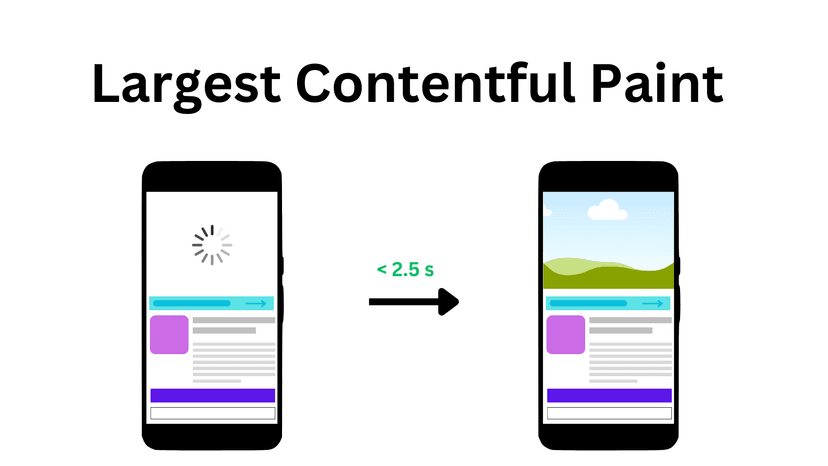
Some SEO signals are updated slowly. Core Web Vitals, Google’s metrics for page loading speed and responsiveness, are measured using real user data collected over a rolling 28-day window. A rough ship can lock in poor performance scores for up to a month, even if the underlying issues are fixed the next day.
This is the argument for measuring performance on staging before you ship. Problems caught there don’t leave a trace in Google’s data. Problems caught after do, for 28 days.
During this window, monitor weekly:
- Organic traffic compared to your pre-migration baseline, broken down by site section
- Keyword rankings for your most important terms
- The Coverage and Core Web Vitals reports in Google Search Console
A 10-20% temporary dip is normal as search engines process the changes. A sustained decline beyond that, or a decline concentrated in a specific section of the site, points to something specific worth investigating.
The second crawl
At the 28-day mark, run another full crawl. This second site crawl gives you a clear picture of your website migration recovery: which pages have stabilized, which are still underperforming, and whether any SEO issues from the migration are still active.
A note on AI search
Traditional SEO is still the core approach to drive organic traffic, while AI search is just another layer, like a new level to gain, a new round with new rules. But, this is also the biggest area of risk during any site migration. But the landscape is changing.
AI-powered search, e.g. Google’s AI Overviews, Perplexity, ChatGPT, now drives a meaningful and growing share of traffic across most industries. In some verticals, AI-generated answers already account for more initial discovery than traditional results.
One risk that’s specific to this migration path: most AI crawlers don’t render JavaScript. Testing of major AI systems, ChatGPT, Perplexity, Claude, and others, has consistently shown that none of them execute client-side rendering.
If you’re migrating from a traditional server-rendered CMS to a headless setup and any of your key pages end up as JavaScript-dependent SPAs, those pages are effectively invisible to AI discovery systems, even if Google indexes them without issue.
This is a new failure mode specific to the headless transition. Googlebot has become much better at rendering JavaScript over the years. AI crawlers haven’t. The fix is the same as for traditional SEO: use SSR or SSG for content that needs to be discoverable, but the reason to care is different, and most migration checklists don’t mention it.
Structured data now carries more weight than it used to. In traditional Google search, structured data was the path to rich results, useful, but optional for most sites.
In AI-powered search, it’s one of the primary ways AI systems understand and classify what your content is about. A website migration that loses structured data loses visibility in both systems simultaneously.
Everything else in this SEO migration checklist: redirects, metadata, URL structure, monitoring, applies equally to both traditional and AI search. Get the fundamentals right, and you’re covered on both fronts.
SEO Migration Plan by Phases
| Phase | Task | Priority | Notes |
|---|---|---|---|
| Pre-Migration | Export 12 months of Google Search Console data | Critical | Clicks, impressions, avg. position per page |
| Pre-Migration | Export 12 months of analytics organic traffic | Critical | Segment by site section |
| Pre-Migration | Crawl and export all live URLs | Critical | Include paginated, filtered, and parameter URLs |
| Pre-Migration | Document all page titles and meta descriptions | Critical | Export via Screaming Frog |
| Pre-Migration | Audit internal linking structure | High | Map key hub pages and their link depth |
| Pre-Migration | Document all structured data markup | High | Note which pages carry rich result eligibility |
| Pre-Migration | Record hreflang setup (if multilingual) | High | Document per-language URL patterns |
| Pre-Migration | Build complete redirect map (old URL → new URL) | Critical | Every URL needs a destination or a retirement decision |
| Pre-Migration | Identify top 50 highest-traffic pages | High | These need individual post-launch verification |
| Pre-Migration | Benchmark Core Web Vitals on live site | High | Use PageSpeed Insights per key template |
| Staging | Block crawlers via robots.txt on staging | Critical | Confirm it will be reversed on production |
| Staging | Set all canonical tags to live domain (not staging) | Critical | Common and damaging if missed |
| Staging | Validate all 301 redirects in redirect map | Critical | Test every URL, not just a sample |
| Staging | Verify page titles and meta descriptions render | Critical | Check both CMS fields and frontend output independently |
| Staging | Test structured data with Rich Results Test | High | Validate per template type |
| Staging | Crawl with JS disabled | High | Confirm content visible without JavaScript rendering |
| Staging | Audit H1–H3 heading structure per template | High | Compare against pre-migration baseline |
| Staging | Test URL parameter handling | High | Confirm legacy parameters redirect correctly |
| Staging | Run Core Web Vitals audit (Lighthouse) | High | Fix before launch to avoid 28-day data window penalty |
| Staging | Verify XML sitemap is generated and accurate | Medium | Should include all canonical URLs, no staging URLs |
| Launch Day | Verify robots.txt allows crawling | Critical | First thing. Named person responsible. |
| Launch Day | Submit updated XML sitemap to Google Search Console | Critical | Speeds up recrawl |
| Launch Day | Run full crawl of live site | Critical | Compare immediately against pre-migration baseline |
| Launch Day | Spot-check top 50 pages manually | Critical | Title, description, H1, canonical, structured data |
| Launch Day | Check GSC Coverage report for 404 spikes | Critical | Fix missing redirects same day |
| Launch Day | Confirm analytics tracking is live | High | Verify organic sessions are being recorded |
| Post-Launch (Week 1) | Monitor GSC daily for crawl errors | Critical | 404s and redirect chains are priority |
| Post-Launch (Week 1) | Track keyword rankings for top 20 terms | High | Use Ahrefs, SEMrush, or Search Console |
| Post-Launch (Week 1) | Monitor organic traffic vs. baseline | High | 10–20% dip is normal; beyond that, investigate |
| Post-Launch (28 Days) | Run second full site crawl | Critical | Compare vs. baseline and day-one post-launch crawl |
| Post-Launch (28 Days) | Review Core Web Vitals in GSC | High | Field data now reflects real post-launch performance |
| Post-Launch (28 Days) | Identify any pages still underperforming | High | These become your remediation priority list |
| Post-Launch (28 Days) | Confirm rich results still appearing in SERPs | Medium | Search key branded and structured data queries |
| Post-Launch (28 Days) | Final redirect audit — catch any remaining gaps | Medium | Cross-reference 404 log with original URL export |
Final Steps
If CMS migration done right, it will be invisible to your content team. A migration done wrong (based on SEO migration checklist) shows up in your GA, GSC, or SEMrush, four weeks later. The gap between the two is almost always in the preparation, in the website migration plan.
If you need help with moving your website and creating a SEO migration checklist or any other SEO migration services, share your case and let’s get in touch with our headless CMS agency. We’ll review your setup carefully, and help you migrate a website without losing the rankings you’ve already earned.

 Katarina Harbuzava