
Sanity’s Perspectives feature gives developers explicit control over which document subset is returned in queries — draft, published, or raw. Instead of writing complex GROQ filters to handle preview logic, you can now specify the desired content state at the API level, letting Sanity handle the selection automatically.
At the end of 2021, the Sanity team made a significant breakthrough in solving the long-awaited issue with document referencing by releasing the “References in Place” feature.
What opportunities for content modeling does it give us in 2023 and has the problem with references completely been solved? The short answer is no, not completely.
However, now we have the opportunity to get the desired result by starting from new possibilities.
Problem statement
-
Content modeling for most of the projects is unthinkable without links between documents. In Sanity, there is a field type for this - reference
-
Also, modern headless CMSs assume publishing flow with at least two document states: draft and published. In Sanity, this feature is provided out of the box - you can edit draft documents, publish them and then re-change them again
-
We want to be able to preview content before publishing it. There is also such an opportunity - by filtering documents by their IDs detecting theirs belonging to drafts or published document versions.
So everything looks fine, can we start implementing it? No, not yet, actually. The problem lies in the fact that all together it does not work. The point is that we can’t have references to draft versions of documents in Sanity Studio. If such a connection is necessary and you simply cannot get it, then your app is broken on the preview environment.
Previously it worked this way: you had to publish the document and only after that add a reference to it. But the published document went into production. Here is such a vicious circle. So what has changed after the release of “References in Place” and how will it help solve our problem?
References in Sanity Studio
Sanity References in Place: How Draft Document Referencing Works Before the “References in Place” feature, Sanity filtered out draft documents from the reference dropdown entirely — meaning you could only link to already-published content. This created a significant limitation for preview workflows.
With References in Place, Sanity now allows you to select and reference unpublished documents directly from the Studio interface. However, there is an important behavior to understand: the _ref field always stores the published document ID, even if the referenced document has never been published.
This is a deliberate design decision by the Sanity team — you can read the full reasoning and UX implications in their official release post. Understanding the trade-offs they made is useful context before diving into the data fetching side.
What this means in practice
Consider a schema where Document A contains a reference field pointing to Document B, and both exist only as drafts. Here’s what Sanity stores under the hood:
Table 1. Document IDs and reference

Note that the entry with _id “fe835523-7186-4520” does not currently exist. Are you wondering how a strong link can point to a non-existent document? This is the essence of the new Sanity feature. If we open the document in the inspector, we will see that Sanity Studio itself has added the following fields to the reference object:
-
weak: true. Don’t worry, this is temporary only and will be removed as soon as Document A is published
-
_strengthenOnPublish - This property tells Sanity Studio that the link will need to be strengthened when the document is published.
That is after we publish Document B and then Document A, our reference will take the regular, familiar to us form. Once published documents still cannot reference drafts, however, drafts themselves can be linked. We just need to learn how to extract these connections.
Table 2. Referencing ability
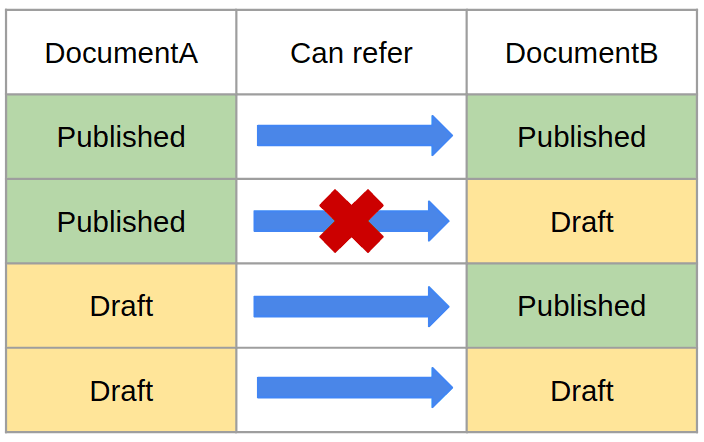
Spotted: An funny point is that if you decide to “unpublish” document B, then Sanity Studio will not return the link to its original state, but simply inform you about the impossibility of this operation.
Preview environment setup
Let’s consider the simplest example of a schema containing documents of the type Post and the type Author. Post has a reference to an Author. You can get such a content model as a sample if you select “Blog (schema)” when you initialize a new project with the Sanity CLI.
Image 1. Select starter project
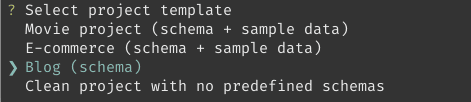
Obviously, we will show only published content on production. Let us have a public dataset, so that means the published content is available without a token, and only authed requests can query draft documents. To fetch information about posts and authors, we can write, for example, the following GROQ query:
Script 1. Simple GROQ query
* [_type == "post"] {

...,

author->

}
On production, this request will return exactly what we plan to show to users.
Let’s also agree that we are not going to create separate versions of the application for production and preview environments. It should be the same code, behaving differently based on environment variables. In particular, in our case, this means that the GROQ query should be the same, and the difference will be in having or missing auth token, which gives us all or a published-only subset of document variants.
So how do we write a query that would give us the following result?
Table 3. Content environments
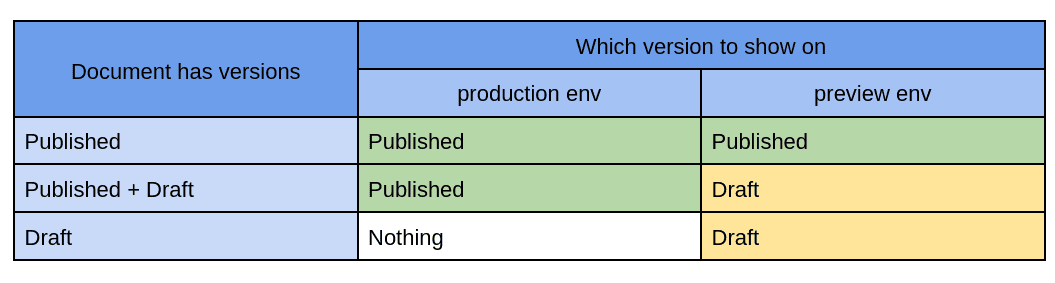
Suppose we have a new author and they wrote their first post. The editor-in-chief needs to preview and approve both documents (the author page and the post itself) prior to publication. For that, the editor-in-chief wants to open these pages on the preview. Each page contains information given from both documents.
Obviously, by executing the query from [Script 1], we will get all the posts from the dataset. However, the link author-> to the author will be empty, because at the moment it refers to a non-existent document.
Getting references
How can I get a draft of a document when I have a reference to the published version? Let’s add the “drafts.” suffix to the id.
Script 2. Querying draft reference
* [_type == "post"] {

...,

"author": * [_id == ("drafts." + ^.author._ref)][0],

}
Great, now the author field will contain the data of the draft author in the preview environment. However, this way we broke our app on production because, for published authors, the author field will be wrong. It simply will be empty as still trying to get a draft document.
Let’s fix it properly.
Script 3. Getting correct variant
* [_type == "post"] {

...,

"author": coalesce( * [_id == ("drafts." + ^.author._ref)][0], author->)

}
Let’s see what’s going on here. The coalesce function returns the first non-null result. In production, the first argument will always be null, since drafts are automatically filtered out, and on the preview, if a draft exists, then according to Table 3 we should display it. Now our references link to the correct versions of the documents.
Getting documents
If some posts were published and then re-edited, then our GROQ query will return a list of posts including all available draft and published versions. Obviously, we don’t want to show both versions of one post at once - the site should look the way it will be after all the documents are published. Let’s find a way to filter documents the way we want.
The difficulty here is that by making a request for a document of a certain type, we get a flat list of all available variants of documents on that dataset. Literally, such a query will return an ID array containing both the id of the published documents and the drafts.
Script 4. Getting correct variant
* [_type == "post"]._id
Moreover, some id will appear in two variants at once: “drafts.xxx-yyy” and “xxx-yyy”. Complicating matters is the fact that Sanity does not directly link drafts and public documents to each other. This leads to the fact that having received any document, we cannot simply find out if it has another version. The intersection of published and draft document spaces is shown in Image 2.
Image 2. Subsets of published and draft IDs
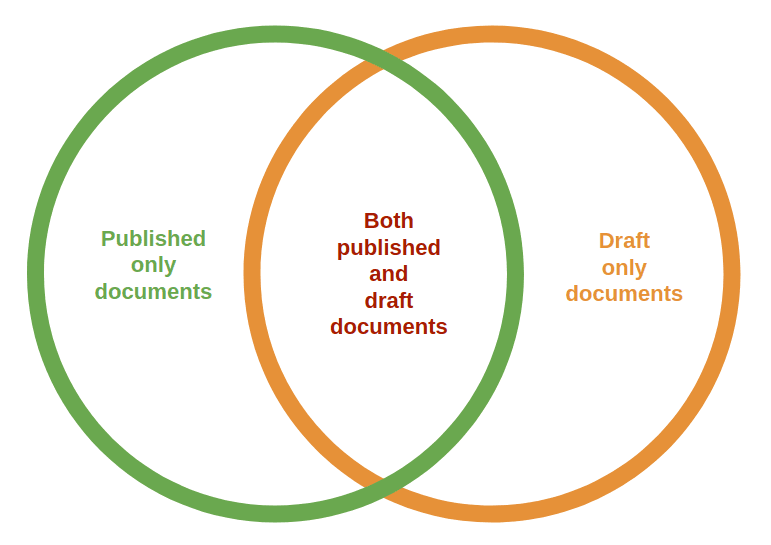
The only way to find out if the received document has a complimentary variant is to generate that variant ID and check the document’s existence.
For example, this is how you can get a draft for each published document: "draft": * [_id == ("drafts." + ^._id)].
Let’s write a query to get the required selection of documents.
Script 5. Selecting documents
{

"docs": * [_type == $type]

}

{

"drafts": @.docs [_id in path("drafts.**")],

"published": @.docs [!(_id in path("drafts.**"))],

"coupled": @.docs [!(_id in path("drafts.**"))]{"published": {...}, "draft": ^.docs [_id == "drafts." + ^._id][0]},

}

{

"allCoupled": [...@.coupled, ...@.drafts [!(@._id in ^.published[]{"_id": ("drafts." + _id)}._id)]{"draft": {...}}],

}

{

"selected": @.allCoupled[]{

...coalesce(@.draft, @.published)

},

}.selected[] {

...,

"author": coalesce( * [_id == ("drafts." + ^.author._ref)][0], author->)

}
Let’s see what’s going on here.
-
docsis an array of all variants of documents of the type we need. If necessary, you can add additional conditions to the filter. -
draftsandpublished- here we divide all variants by published and draft IDs. Obviously, some documents have both versions, and some have only one. -
coupled- into this array we put objects describing full versions of documents that were ever published. Each such object contains two properties: “draft” and “published”, where we’re keeping the corresponding variants. If a document lacks a draft version, then the “draft” property will be null. -
allCoupled - here we add draft-only documents to the previous array. Thus, as a result, we have a complete list of documents with their variants.
-
To create the selected array, we go through all the documents from allCoupled and select the variant we need. On production, these will only be published versions, and on preview environment - both published and drafts. If both variants are present, the draft will be selected.
For your convenience, all scripts given in this article are placed in a separate GitHub gist.
Disadvantages and Alternatives
The presented solutions allow you to achieve the desired result, but they are not ideal. Script 5 looks too cumbersome to use each time when you need to get a list of documents of a certain type. An alternative solution is to get all documents with a simple query and filter them using JavaScript.
Another problem is that you need to constantly keep this solution in mind when writing a new query. For example, when retrieving a document by reference using Script 3, we must not forget how we do it.
And here we come to a more global problem. Let’s take the experience we have at FocusReactive. We work a lot with projects on the jamstck and related technologies. On especially large projects, we, being experts in Headless CMS, develop only the CMS part, while client applications are developed by other teams. While we do our best to document the CMS, we still have no control over the code written on the frontend side.
And all requests and post-processing just happen on their part. From this point of view, the following requirements for the CMS are becoming a priority for us:
-
Transferring the logic of content selection for a given env from the client to the CMS part.
-
Simplifying the complexity of GROQ queries written by front-end developers as much as possible
An ideal solution for us would be a case where any front-end developer, after a short onboarding and learning the documentation, based on simple and clear instructions, could solve their daily tasks. At the FocusReactive team, we have made quite a bit of progress in this direction by customizing Sanity Studio and using custom auth tokens.
This solution will hardly fit into a single article, but if you are interested, we disclose some implementation details in this publication Multi Environment publishing flow with Sanity CMS.
What an Ideal Sanity Draft/Published Selection Would Look Like
From a developer’s perspective, the logic for handling draft and published documents in Sanity should be straightforward. The core requirements reduce to two simple rules:
Document pairing — all available documents should be split into draft/published pairs, explicitly linked to each other. Some pairs may have only one variant present.
Variant selection — choosing the correct variant from each pair should follow a simple, predictable rule based on the presence of a draft version.
Unfortunately, the current GROQ implementation doesn’t offer a native tool for this. The workarounds covered in this article get the job done, but they add complexity to every query and require every developer on the team to stay aware of the pattern.
That said, Sanity is an actively evolving product and its team is known for responding to community needs. The “References in Place” feature itself is proof of that. Handling draft/published selection natively in GROQ could well be the next step — and the more developers raise this need, the sooner it may arrive.
Work With a Sanity CMS Agency
If you’re navigating complex Sanity CMS setups, headless CMS migrations, or building composable architectures on Next.js, FocusReactive can help. We specialize in Sanity CMS development, headless CMS migrations, and web performance optimization — helping teams move from legacy CMS platforms to modern, composable stacks and ship faster.
Let’s talk through your specific situation. Get in touch with our engineering team.
.jpg&w=1920&q=75)