

This guide shows how to build a production-ready multi-step form with React Hook Form, Zod, and Next.js, from an empty app to a working Server Action without storing form values in useState. It focuses on the practical problems developers encounter in complex forms, including component libraries, conditional fields, validation, server errors, and performance.
TL;DR
- React Hook Form avoids a React state update for every keystroke. In our 20-field test, typing 19 characters caused 19 React commits with a controlled
useStateform and none with React Hook Form. - Zod gives the client and server one validation schema. The same schema validates the form on both sides and generates its TypeScript type with
z.infer. registerworks with native inputs, not every component-library input. For Radix-based components such as Select and RadioGroup, useControllerand connectfield.onChangeto the component’s value callback.- A multi-step form can use one
useForminstance. Keep the form at the wizard level, pass it to each step withFormProvider, and validate the current step withtrigger(fields). - Server validation still matters. Client-side validation improves the user experience, but the server must validate the submitted data again.
- Large forms do not have to load with the page. In our production test, moving the form behind a lazy boundary reduced the page’s initial JavaScript by 88 KB gzipped.
What is React Hook Form used for?
React Hook Form is a library for managing form state and validation in React. With it, you can build validated forms, multi-step wizards, dynamic field arrays, and Next.js server actions while sharing a single Zod schema across client and server.
As forms become larger and more dynamic, two problems tend to appear at the same time:
- Boilerplate: a controlled form needs state, a change handler and a validation branch for every field. Repeat that twenty times and the file is hard to read.
- Speed: each of those fields is bound to React state, so typing re-renders the tree. By the time a form is big enough to be worth the effort, it’s big enough to feel slow.
Why do React forms get slower as they grow?
In a controlled form, every keystroke updates React state, and every field under that state re-renders. Twenty fields means twenty re-renders per character, so the cost grows with the form. React Hook Form skips those re-renders.
We’ve tested two 20-field forms side by side, with the same markup, on React 19.2.8 and react-hook-form 7.86. We typed 19 characters into one field:
| React commits while typing 19 characters | |
|---|---|
Controlled, useState |
11–19 (up to one per keystroke) |
| react-hook-form | 0 |
The controlled form recorded 19, 17 and 11 commits across three runs. The range comes from React batching rapid keystrokes. React Hook Form recorded zero every time. To confirm the counter worked, we triggered a failed validation, which must commit. It recorded exactly one.
The difference is where the value lives:
- Controlled: the value is React state. Each keystroke calls a setter and re-renders the component and everything below it.
- Uncontrolled: the input keeps its own value, like plain HTML. React Hook Form holds a ref and reads it on submit, or when you subscribe with
watch.
That’s the trade-off: React no longer holds the live value, so typing doesn’t cause re-renders. Subscribing with watch brings them back for the fields you watch.
React Hook Form vs Formik vs Redux Form
Which form library should you choose?
-
React Hook Form is usually the best default choice for new React forms. It uses uncontrolled inputs and minimizes re-renders while providing strong TypeScript and validation support.
-
Keep Formik if you already use it and the forms are small. The migration cost is often higher than the performance benefit.
-
Keep Redux Form if you inherited it and have not budgeted a migration yet. It carries no deprecation flag on npm, but the pace of development has slowed significantly compared with modern alternatives such as React Hook Form.
React Hook Form vs Formik vs Redux Form: comparison of form state management, rendering behavior, validation support, and package size.
React Hook Form, Formik, and Redux Form take different approaches to managing form state.
| React Hook Form | Formik | Redux Form | |
|---|---|---|---|
| Form values | Uncontrolled inputs and refs | React state | Redux store |
| Rendering model | Re-renders only subscribed fields | Form state updates on every keystroke | Store dispatch on every keystroke |
| API | Hooks | Components and hooks | Higher-order components and Redux |
| Schema validation | Resolvers such as Zod, Yup, and Valibot | Built-in Yup support; custom validation | Custom validate functions |
| Best-known use case | Large or performance-sensitive forms | Existing Formik applications | Existing Redux-based applications |
If you already have a Formik or Redux Form application, the choice isn’t just about swapping libraries. Migrating means changes to tests, UI, validation, and possibly state management. Weigh that cost against the performance or maintenance benefits before you commit.
What does a multi-step form in React need?
The example is a three-step agency lead form: contacts, project details, and timeline/reference links. It validates per step, shares one Zod schema with the server, and submits through a Next.js server action.
The example was built and verified with:
- Next.js 16.3.2 on the App Router, React 19.2.8, TypeScript
- react-hook-form 7.86, zod 4.4.3,
@hookform/resolvers5.9.1 - radix-ui 1.6.7 and react-day-picker 10, under shadcn/ui on Tailwind
shadcn/ui is not a dependency you install: its CLI copies component source into your repo, and those components are Radix primitives with Tailwind classes on them. Both names appear below and they mean different layers: Radix decides how a component behaves, shadcn decides how you compose it.
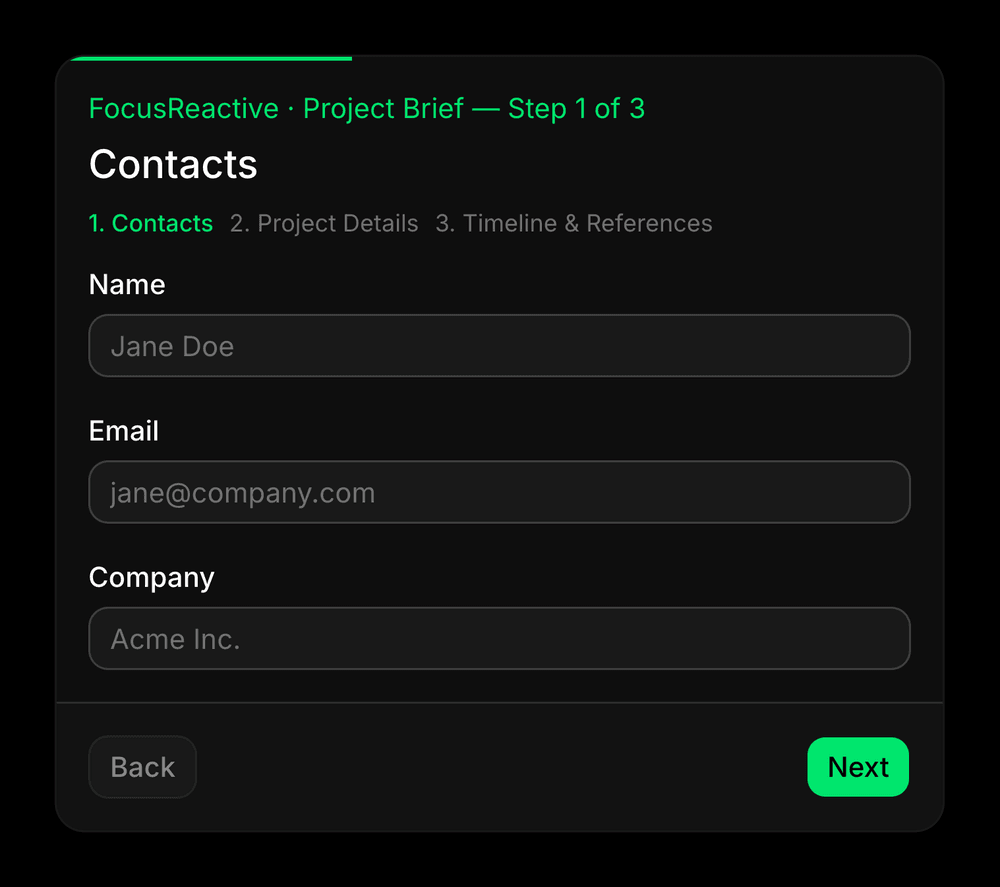 Step one of the brief form. Every section below adds one capability to this same form.
React Hook Form: How useForm, register, and handleSubmit work
Three pieces are enough to get started: useForm creates the form, register connects native inputs to it, and handleSubmit runs validation before calling your submit handler. React Hook Form’s own API documentation covers every option; this section is the short path through it.
One package to start:
npm install react-hook-form
import { useForm } from "react-hook-form";

const {
  register,
  handleSubmit,
  formState: { errors },
} = useForm();

<Input id="name" placeholder="Jane Doe" {...register("name")} />;
{
  errors.name && (
    <p className="text-sm text-destructive">{errors.name.message}</p>
  );
}
register("name")returns the props a native input needs:name,onChange,onBlurand aref. Spreading them puts the field under React Hook Form’s control. Note what is absent: novalueprop, nouseState.handleSubmit(onSubmit)calls your handler only after validation passes, passes your handler the submitted values with the TypeScript type you defined.formState.errorsis the one part that does re-render, and only in the component reading it.useForm()is untyped here on purpose. The types arrive in the next section, derived from the schema rather than written by hand.
React Hook Form with Zod: One Schema for Validation and Types
React Hook Form works especially well with Zod because a single schema can define validation rules, generate TypeScript types, and run on both the client and the server.
React Hook Form can validate inline, and register("email", { required: true, pattern: /…/ }) works. But those rules sit in JSX. The server can’t use them, and TypeScript learns nothing from them.
To use React Hook Form with Zod, install the schema library and the resolver that connects Zod to React Hook Form.
npm install zod @hookform/resolvers
import * as z from "zod";

export const contactsSchema = z.object({
  name: z.string().min(2, "Name must be at least 2 characters"),
  email: z.email("Enter a valid email"),
  company: z.string().optional(),
});

export type ContactsValues = z.infer<typeof contactsSchema>;
Wire it in with the resolver, and useForm becomes fully typed from the schema:
import { useForm } from "react-hook-form";
import { zodResolver } from "@hookform/resolvers/zod";

const form = useForm<ContactsValues>({ resolver: zodResolver(contactsSchema) });
z.infer builds the TypeScript type from the schema, so the rules and the types can’t drift apart. Field names are checked against it too: register("emial") stops compiling.
Each step of the form gets its own schema: contactsSchema, projectDetailsSchema, timelineRefsSchema. The multi-step section composes them into one.
One warning if you’re following an older React Hook Form with Zod tutorial: most examples were written for Zod 3, and several APIs changed in Zod 4. Check the code against Zod’s migration guide.
Why doesn’t register work with a Select or a date picker?
register is designed for native form inputs. Many component-library controls use a different API. Radix Select, for example, reports changes through onValueChange, while a native input uses onChange with an event. The same applies to shadcn/ui’s Select because its implementation is based on Radix Select.
The demo’s Select lists the headless CMSs we work with. If you’re still choosing a headless CMS for React, that comparison is a separate read.
Controller is the bridge. It subscribes to the field and gives you a field object to wire up yourself:
import { Controller } from "react-hook-form";

<Controller
  control={control}
  name="projectType"
  render={({ field }) => (
    <RadioGroup value={field.value ?? ""} onValueChange={field.onChange}>
      {/* … */}
    </RadioGroup>
  )}
/>;
Two details in that snippet matter:
- Wire
onValueChange={field.onChange}rather than spreading{...field}, because spreading passes a DOMonChangethat Radix ignores, and the field silently never updates. - Pass
value={field.value ?? ""}, because the""keeps the component controlled from the first render, whereundefinedmakes Radix switch modes mid-life and warn.
If you use shadcn/ui with React Hook Form, note that the current shadcn React Hook Form guide builds forms from the Field parts with Controller directly. Most tutorials still show the older Form/FormField wrapper, and neither approach is deprecated, but the Field components are what shadcn documents today, and they are what this article uses.
React Hook Form Conditional Fields: watch vs useWatch
A conditional field appears only when another field holds a specific value. For conditional fields, subscribe to the controlling field with useWatch. Bare watch() subscribes the component to the whole form. That can cause it to re-render when unrelated fields change. useWatch lets you subscribe only to the field that controls the conditional UI.
import { useWatch } from "react-hook-form";

// re-renders only when projectType changes
const projectType = useWatch({ control, name: "projectType" });
| Subscribes to | Re-renders on | |
|---|---|---|
watch() |
the entire form | any change to any field |
watch("projectType") |
one field, but in the parent’s render | that field |
useWatch({ control, name }) |
one field, in its own subscription | that field only |
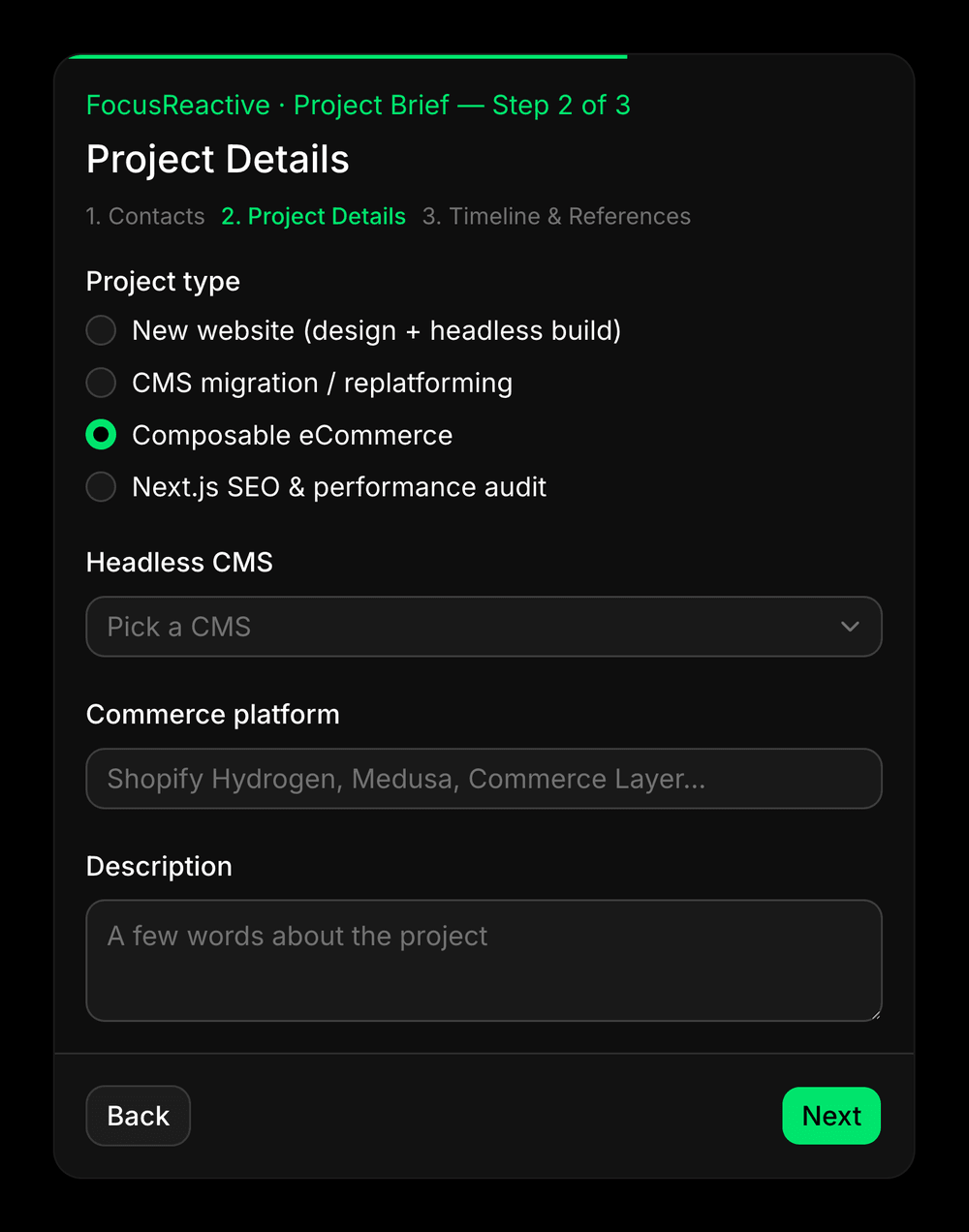 Commerce platform appears only for an eCommerce project. One useWatch subscription decides it.
Why not use a discriminated union for conditional fields?
A discriminated union can model conditional fields precisely, but it makes the form type harder to work with.
The inferred type becomes a union of different object shapes. That can make shared fields awkward to register and makes defaultValues harder to define.
For this form, a flat object with an optional platform field is simpler. The refinement then makes platform required only when projectType is "e-commerce".
.refine() keeps one flat type, and it reads like the rule itself:
export const projectDetailsSchema = z
  .object({
    projectType: z.enum(
      ["website", "cms-migration", "e-commerce", "performance-audit"],
      {
        error: "Select a project type",
      },
    ),
    cms: z.enum(["sanity", "storyblok", "contentful" /* … */], {
      error: "Select a CMS",
    }),
    platform: z.string().optional(),
    description: z.string().max(500, "Keep it under 500 characters").optional(),
  })
  .refine(
    (data) => data.projectType !== "e-commerce" || !!data.platform?.trim(),
    {
      error: "Commerce platform is required for eCommerce projects",
      path: ["platform"],
    },
  );
path: ["platform"] is what puts the error on the field instead of at the form root.
The downside is that Zod skips refinements while the base fields are still failing. Submit an e-commerce brief with no CMS and you get the CMS error first, then the platform error on the next submit.
How do you build an add-and-remove list of fields?
React Hook Form’s useFieldArray owns the array and gives you fields, append and remove.
The third schema contains the timeline and reference fields:
export const timelineRefsSchema = z.object({
  timeline: z.enum(["urgent", "1-2-weeks", "within-a-month" /* … */], {
    error: "Select a timeline",
  }),
  deadline: z.date().optional(),
  references: z
    .array(
      z.object({
        url: z.url("Enter a valid URL"),
        note: z.string().optional(),
      }),
    )
    .max(5, "Up to 5 references"),
});
import { useFieldArray } from "react-hook-form";

const { fields, append, remove } = useFieldArray({
  control,
  name: "references",
});

{
  fields.map((field, index) => <div key={field.id}>{/* … */}</div>);
}

<Button onClick={() => append({ url: "", note: "" })}>Add reference</Button>;
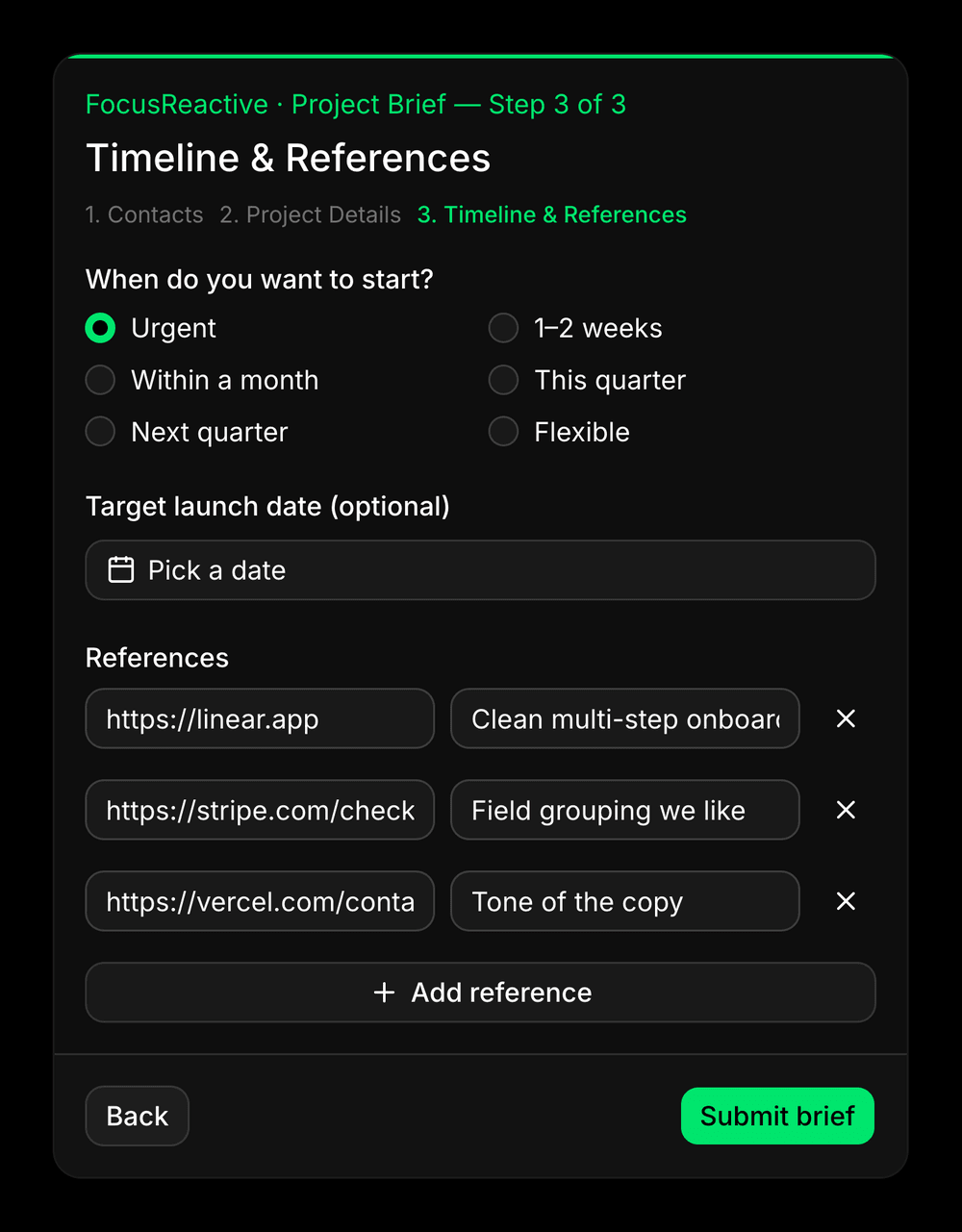 Rows added and removed at runtime by useFieldArray. Each keeps its own values because the key is the row id, not its index.
Use key={field.id} and never key={index}, because React Hook Form generates a stable id per row. With index keys, removing row two can cause React to reuse row three’s DOM node for the new row two. The input may then display the wrong value.
Three more things to know:
append()is typed from the schema, so it won’t let you add a row of the wrong shape. Pass empty strings rather than nothing, or the new inputs start uncontrolled.- A row’s own error sits at
errors.references?.[index]?.url. The.max(5)message does not: it lands aterrors.references?.root. - Set the limit in two places.
disabledon the Add button so the user sees it, and.max(5)in the schema because the client can be bypassed.
React Hook Form Multi-Step Form Validation
One useForm at the wizard level, FormProvider for the steps, and trigger() on the fields of the current step. Only the wizard is a form; a step is just a group of fields.
First the schemas from the earlier sections become one:
export const briefSchema = contactsSchema
  .and(projectDetailsSchema)
  .and(timelineRefsSchema);

export type BriefValues = z.infer<typeof briefSchema>;
.and() rather than .extend(), because projectDetailsSchema carries a .refine() and plain .extend() throws on a refined schema in Zod 4. Zod’s .safeExtend() is the other way round it, and either route keeps the rule and its path.
import { useForm, type FieldPath } from "react-hook-form";
import { zodResolver } from "@hookform/resolvers/zod";

const steps: { title: string; fields: FieldPath<BriefValues>[] }[] = [
  { title: "Contacts", fields: ["name", "email", "company"] },
  {
    title: "Project Details",
    fields: ["projectType", "cms", "platform", "description"],
  },
  {
    title: "Timeline & References",
    fields: ["timeline", "deadline", "references"],
  },
];

// The wizard owns two pieces of state: which step is showing, and the form itself.
const [step, setStep] = useState(0);
const form = useForm<BriefValues>({ resolver: zodResolver(briefSchema) });

const next = async () => {
  const fields = steps[step].fields;
  const valid = await form.trigger(fields, { shouldFocus: true });

  if (valid) {
    setStep((s) => s + 1);
  }
};
The resolver still receives the form data, but trigger(fields) limits which fields React Hook Form reports as invalid. That means step three does not display errors while the user is validating step one.
This is where the state survives. Moving off step one unmounts its inputs, but their values stay in the form, because shouldUnregister defaults to false. Back and Next only change which step renders, so the user’s earlier answers are still there when they come back, and the final submit re-validates the whole schema.
Why does clicking Next submit the whole form?
If Next and Submit render in the same conditional slot, the last step submits the whole form on the click that takes you there. Every step the user hasn’t filled in then shows errors.
const isLastStep = step === steps.length - 1;

// The form lives in the card body; the buttons live in the footer, outside it.
// `form="brief-form"` is what lets the submit button reach it.
{
  isLastStep ? (
    <Button key="submit" type="submit" form="brief-form">
      Submit brief
    </Button>
  ) : (
    <Button key="next" type="button" onClick={next}>
      Next
    </Button>
  );
}
React Hook Form is not causing the submission. The issue comes from changing the button’s type during the click. It happens because React and the browser disagree about when a click is finished.
- React reuses the DOM node. Next and Submit occupy the same position in the tree, so React edits the existing button instead of creating a new one.
- The
nexthandler isasync, so React flushes the queued re-render at the microtask checkpoint before the browser finishes processing the click. - By then, the button’s
typehas changed frombuttontosubmit, so the browser runs the default action for a submit button and submits the form.
Different key values fix it. React then replaces the node instead of editing it, so the button the browser finishes the click on is the one it started on. Verified with a Playwright event trace on RHF 7.86: trigger() is correctly scoped and isn’t the cause.
How do you validate the same schema on the server?
Import the same schema into your Server Action and validate the data there as well. Client-side validation improves the user experience, but it is not a security boundary. Every submission still has to be validated on the server.
“use server”;
| { ok: true } | { ok: false; fieldErrors: Partial<Record<keyof BriefValues, string[]>> };
values: unknown,
): Promise
const parsed = briefSchema.safeParse(values);
if (!parsed.success) {
return {
ok: false,
fieldErrors: z.flattenError(parsed.error).fieldErrors,
};
}
return { ok: true };
}
`z.flattenError` is the Zod 4 API for turning a validation failure into per-field error arrays.
Dates deserve extra attention. When a date crosses the Server Action boundary, timezone conversion can produce unexpected results. A local date may arrive as the previous UTC date if the user's timezone is ahead of UTC.
For example, midnight on September 5 in UTC+3 becomes 21:00 UTC on September 4. Always inspect the actual value received by the server before applying date-based validation.
## How do you show a server error on the correct form step?
Returning field errors isn't enough in a multi-step form.
If the server rejects a field from step one while the user is viewing step three, the error exists in the form state but remains invisible. The user sees a failed submission and no explanation.
The solution is to:
1. Map server errors into React Hook Form.
2. Find the first step that contains an errored field.
3. Navigate back to that step.
4. Focus the first invalid field.
```typescript

const errored = Object.keys(result.fieldErrors) as (keyof BriefValues)[];

for (const field of errored) {
  form.setError(field, {
    type: "server",
    message: result.fieldErrors[field]?.[0],
  });
}

const firstErroredStep = steps.findIndex((s) =>
  errored.some((field) => s.fields.includes(field)),
);

if (firstErroredStep === -1) return;

// flushSync commits the step change first, so the input exists when we focus it.
flushSync(() => setStep(firstErroredStep));

const target = errored.find((f) => steps[firstErroredStep].fields.includes(f));
if (target) form.setFocus(target);
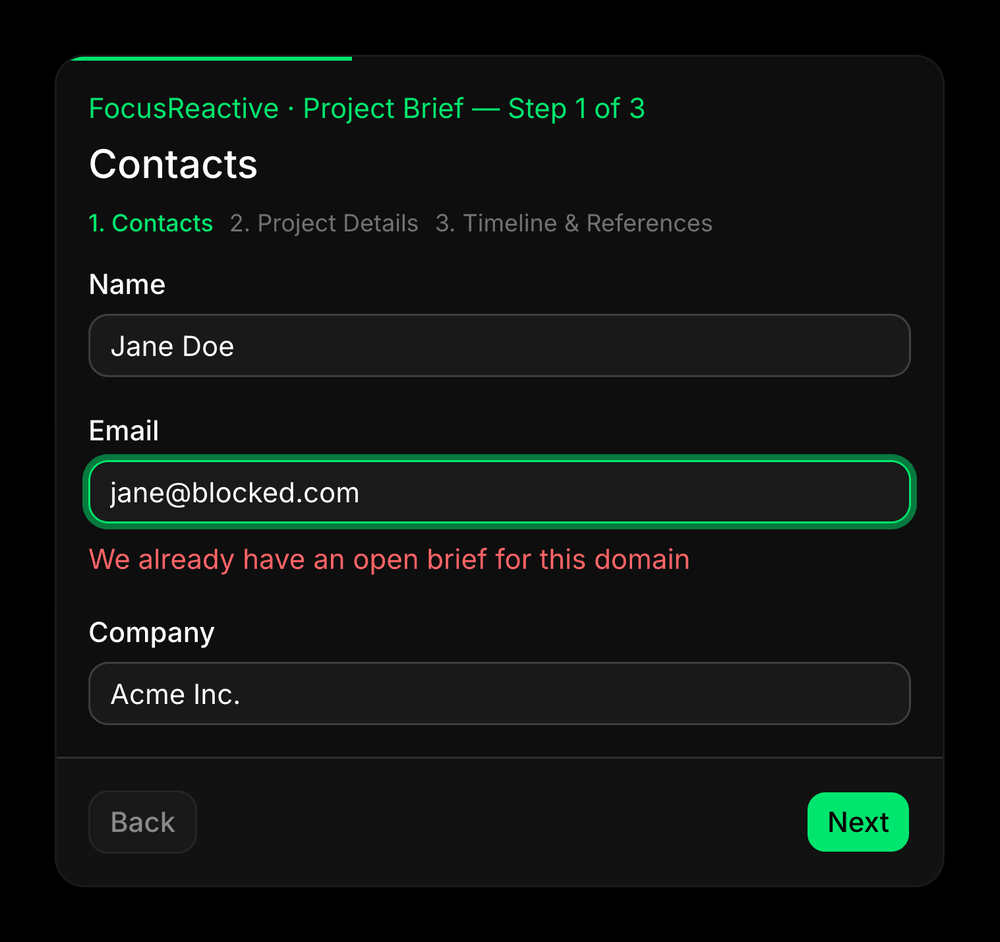 The server rejected the email, so the form jumped back to step one and put the cursor in the field that failed.
setError(field, …, { shouldFocus: true }) looks like it should cover this, but the docs are explicit that it only works while the input’s reference is registered, and after a step jump it is not. setError and setStep run in the same tick, so the new step hasn’t rendered when focus is requested and the call does nothing. flushSync commits the step change first, which is why the input exists by the time setFocus asks for it.
How do you validate against the database while the user is typing?
Database-backed validation belongs in the schema.
When you use a resolver, React Hook Form delegates validation to that resolver. Validation rules defined inline with register no longer run. The schema becomes the single source of truth.
Zod supports asynchronous refinements, and zodResolver automatically calls parseAsync, so Promise-based validation works without additional wiring.
const contactsSchema = z.object({
  name: z.string().min(2, "Name must be at least 2 characters"),
  email: z
    .email("Enter a valid email")
    .refine(
      async (email) => !(await isDomainBlocked(email)),
      "We already have an open brief for this domain",
    ),
  company: z.string().optional(),
});
Set mode: 'onBlur' when you do this, because the default validates as the user types, which means one request per keystroke against your own endpoint:
const form = useForm<BriefValues>({
  resolver: zodResolver(briefSchema),
  mode: "onBlur",
});
A couple of important caveats:
- Client-side validation only improves UX. The same rule must still run on the server, because client validation can always be bypassed.
- Once a schema contains async refinements, the entire schema becomes asynchronous. Any code parsing it outside React Hook Form, including your Server Actions, must use
safeParseAsyncinstead ofsafeParse.
How do you scale React Hook Form across an entire site?
Once a project grows beyond a single form, the challenge shifts from validation to maintainability. On one production site, we replaced six independent forms with a single schema-driven renderer powered by React Hook Form. Contact forms, careers applications, franchise enquiries, and booking forms now share the same rendering and validation pipeline. Instead of hard-coding forms in React, editors manage fields through the CMS and the renderer builds the form dynamically.
| Before | After | |
|---|---|---|
| Forms | Six, one per page file | One renderer, driven by the CMS |
| Validation rules | Inline in JSX, next to each input | One function, keyed on the field’s type |
| Error messages | Optional in practice | Impossible to omit |
| That last row is the missing error message caused a real usability problem. The old contact form registered a name field like this: |
{...register("fullName", {
  required: "Name is required",
  pattern: /^[a-zA-Z ]+$/,
})}
The pattern carries no message, and the markup below it only rendered an error when errors.fullName.type === "required". Type a digit into your name and the border turned red, the type was "pattern", the paragraph never rendered, and the form told you nothing happens at all. The rule that replaced it is simpler, but more consistent: every entry returns { value, message }, so there is nowhere to put a rule without one.
The snippets below come from that codebase. Copy the shape; the helpers and types belong to that project.
const { register, control, handleSubmit, formState, setFocus } =
  useForm<FormSubmissionData>({ defaultValues, mode: "onBlur" });

<form onSubmit={handleSubmit(onSubmit, onValidationError)} noValidate>
  {fields.map((field) => (
    <FormFieldRenderer key={field.name} field={field} control={control} />
  ))}
</form>;
fields comes from the CMS. An editor adds a phone field to the careers form, and it appears, validated, with no deploy.
Two rules made that work. A field’s type decides its rules, and all of them live in one function, so the regex guarding one field can’t go missing on the next. Every rule returns { value, message }, so there is nowhere to put a bare pattern: /^[a-z]+$/, which turns the field red and tells the user nothing.
One more thing worth wiring once. handleSubmit takes a second argument almost nobody uses, and it runs when validation fails:
const onValidationError = (errors: FieldErrors<FormSubmissionData>) => {
  const [first] = Object.keys(errors) as FieldPath<FormSubmissionData>[];
  if (first) setFocus(first);
};
On a long form the first error is often off-screen. Without this, the user presses Submit, sees nothing happen, and decides the button is broken.
Does the form need to be part of the initial page load?
Usually not. For a form positioned near the bottom of a page, loading it upfront often wastes bandwidth and delays hydration. On one production page:
| Initial JS for the page, gzipped | |
|---|---|
| Form imported directly | 677 KB |
| Form behind a lazy import | 589 KB |
| That reduced the initial payload by 88 KB, roughly 13%. | |
| The eventual download was slightly larger because of chunk splitting and skeleton UI overhead, but the important improvement was timing. Those 88 KB no longer blocked the initial page becoming interactive. | |
| A practical implementation looks like this: |
"use client";


const FormBlockClient = lazy(() =>
  import("./FormBlockClient").then((m) => ({ default: m.FormBlockClient })),
);


  const [mounted, setMounted] = useState(false);
  useEffect(() => setMounted(true), []);

  if (!mounted) return <FormSkeleton form={form} />;

  return (
    <Suspense fallback={<FormSkeleton form={form} />}>
      <FormBlockClient form={form} />
    </Suspense>
  );
};
Writing the Suspense yourself is what lets the fallback take form, and the mounted guard is what replaces ssr: false, because Next prerenders a plain React.lazy subtree anyway. The trade-off is the skeleton: no <form> in the server HTML, eighteen skeleton nodes hydrating into twelve inputs. A bad trade when the form is the page, free when it sits below the fold.
The same page also pulls 355 KB gzipped of Google reCAPTCHA, 3.9 times the entire cost of the form. Of the roughly 446 KB of form-related JavaScript a form page ships, four fifths is the spam protection. It loads only where a form exists, so the same fix applies: keep it behind the lazy boundary and it never reaches a page without a form.
What breaks after launch?
Errors nobody hears, a disabled field that silently stops submitting, a form that never fills from the API, a button that never enables, and a network error you caused yourself. None of these is in the quickstart.
- A disabled input submits as
undefined, which is React Hook Form’s documented behaviour rather than a bug, so a pre-filled field that you disable quietly stops arriving at the server. The documentation recommendsreadOnly, or disabling the parent<fieldset>, when you want the value preserved. defaultValuesis read once on the first render, so a form populated from an API stays empty when the data lands a moment later. Thevaluesoption is the one that keeps syncing as the data changes.formStateis a Proxy that subscribes only to the properties you actually read, sodisabled={!formState.isValid}inside a conditional never re-renders when validity changes. Destructuring first,const { isDirty, isValid } = formState, is what registers the subscription.- React Hook Form hands you
errorsand stops there, so a screen reader says nothing until you link each message to its input witharia-describedbyandaria-invalidand give the messagerole="alert". Don’t reach foraria-live="polite"here. A polite region is announced only at the next graceful opportunity, at the end of the current sentence or when the user stops typing, so after a failed submit, when focus jumps to the first bad field, the message can be queued behind that change and never heard.role="alert"carries assertive semantics and is announced immediately. - Cancelling your own request lands in
catch: when a new submit aborts the previous one, the old promise rejects with aDOMExceptionnamedAbortError, and unless you check for it you show a network error for something you did on purpose.
Key takeaway
React Hook Form’s biggest advantage is not that it reduces boilerplate. It’s that it lets you centralize validation, keep forms performant, and scale from a simple contact form to complex, CMS-driven workflows without changing the underlying architecture. The patterns that matter most in production are rarely the ones shown in quickstarts: shared schemas, server-side validation, step-aware error handling, accessible feedback, and careful control of what reaches the initial bundle. These decisions are what keep forms maintainable as the application grows.
Planning a migration or a rebuild?
If you’re working on a frontend rebuild, CMS migration, or a new React platform, we’d be happy to help you figure out the right approach. FocusReactive works with teams building modern web platforms with headless CMSs and React. We can review your current setup, identify technical and SEO risks, and help you turn the requirements into a practical roadmap before development begins. Have a project in mind? Start with a CMS migration audit and roadmap.

 Oleg Proskurin

.jpg&w=64&q=90)





.png&w=828&q=90)