
TL;DR
- Move from Edge to Node.js: In Next.js 16.3, remove
export const runtime = 'edge'from pages and Route Handlers. - Pool database connections correctly: Keep the pool at module scope in Node.js, but avoid
max: 1when the platform supports concurrent work within the same instance. - Make webhooks idempotent: Store and deduplicate provider event IDs to prevent duplicate charges, emails, or data updates.
- Move durable work out of the request: Use queues or durable workflows for tasks that must complete reliably.
- Test streaming in production: Check the deployed URL, because proxies and load balancers can buffer a response even when the handler itself is correct.
Most of the Next.js serverless functions I’ve shipped for client projects fall into a few familiar buckets: webhook receivers that must not charge a card twice, on‑demand revalidation endpoints, auth callbacks, thin proxies in front of LLM and embedding APIs, and personalization logic that runs on the request path.
When these backend functions are implemented poorly, the business impact appears immediately. A webhook can accidentally charge a customer twice, damaging trust and increasing support costs. A revalidation endpoint can leave outdated prices or content on the site, hurting conversions. An authentication callback can break the sign‑in flow, preventing users from completing purchases or accessing their accounts. And a function that runs during every page request can slow down the entire site, increasing bounce rates and reducing SEO performance.
The way these functions are written directly affects site speed, reliability, and operational cost long before you choose where the site is hosted. This article focuses on how to build these functions correctly, because strong technical foundations lead to better user experience, stronger SEO, and more consistent conversion paths.
What Counts as a Serverless Function in Next.js?
“Serverless function” is used for four different things in Next.js: Route Handlers, legacy API Routes, Server Actions, and the server render of a dynamic page. The build treats all four as one class. In the build output, a route entry and a page entry have the same shape, each with its own runtime, traced assets, and maxDuration.
Because a dynamic page compiles to the same kind of unit as an endpoint, it runs into the same duration and size limits and is billed the same way.
When you count the serverless functions in your Next.js app, count the dynamic pages too. If you’re concerned about rendering pages as function invocations, that’s a hosting decision addressed in the section on when serverless is not an option.
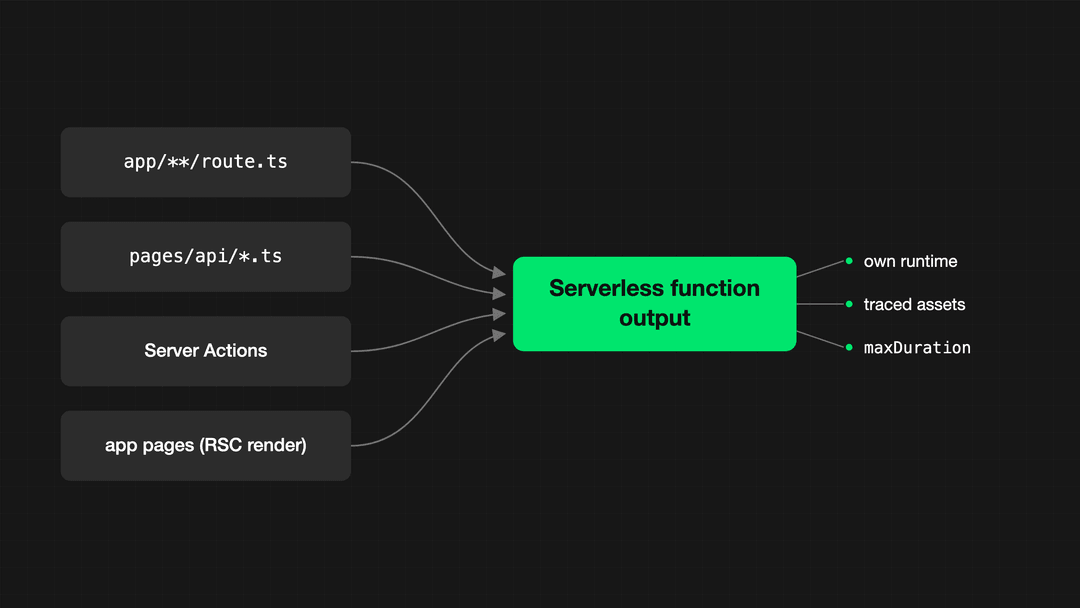 Four Next.js handler types compile to the same serverless function output
| Handler type | Where it lives | Best for | Runtime options |
|---|---|---|---|
| Route Handlers | app/**/route.ts |
JSON APIs, webhooks, SSE, OG images | Node.js (Edge deprecated) |
| API Routes (legacy) | pages/api/*.ts |
Existing Pages Router codebases | Node.js (Edge deprecated) |
| Server Actions | 'use server' functions |
Mutations bound to your own UI | Node.js |
proxy.ts (formerly middleware.ts) |
Project root | Rewrites, redirects, optimistic checks before routing | Platform-dependent |
In Next.js 16, middleware.ts has been deprecated and renamed to proxy.ts. The new proxy.ts convention defaults to the Node.js runtime, while the legacy middleware.ts filename remains available for Edge-runtime use cases during the transition. Do not treat the two filenames as a simple rename if your routing logic depends on Edge-specific behavior.
Three details about Route Handlers earn a paragraph each.
First, method handling is built in: seven HTTP methods are supported as named exports, anything else gets an automatic 405, and OPTIONS is answered for you with a populated Allow header. The if (req.method === 'POST') branching you needed in pages/api is obsolete here.
Second, caching. Route Handlers are not cached by default, and only GET can opt back in via dynamic = 'force-static'. The default flipped in v15.0.0-RC, which means an upgrade from 14 silently removes caching you may have been relying on.
Third, the naming question people actually search for: Route Handlers are the App Router term, API Routes are the Pages Router feature: one concept, two routers. Plus, pages/api is not deprecated: the docs recommend Route Handlers, but API Routes are absent from the Next.js 16 removals list.
The real argument for migrating is capability. Take static exports: with output: 'export' in next.config.js, Next.js builds the entire site as plain static files. A GET Route Handler still works in that mode, running at build time to emit JSON or XML into the export. API Routes don’t work there at all.
Edge Runtime vs. Node.js Runtime
Most of what ranks for “Next.js Edge Functions” still describes the Edge Runtime as a live choice. This section covers what’s actually true now and what to do with the edge code you already have in production.
Deprecated, no longer supported, or removed?
Three different states, and the sources disagree on which one applies:
- The framework says deprecated. Next.js 16.3.0 deprecated
runtime = 'edge'with a single changelog line, implemented as a build-time warning. A route with the export still compiles and still runs, so a green CI run proves nothing about whether you’ve left Edge. Read the build log. - Vercel states these routes and pages are no longer supported. According to its documentation, they now run on Node.js, which extends beyond what the framework itself describes.
- Removed: nowhere. No removal version has been published.
The main exception is the legacy middleware.ts convention, which remains available for Edge-runtime use cases during the migration to proxy.ts. By contrast, proxy.ts defaults to the Node.js runtime in Next.js 16.
The Edge Runtime was never about edge locations
The Edge Runtime is a restricted API surface, not a place. The documentation of the runtime itself says it plainly: “Edge” refers to an orientation toward instant serverless environments, not a specific set of locations. What you signed up for was a trimmed set of web-standard globals with no native Node APIs, no require and no filesystem.
Even before the deprecation, Vercel ran edge functions in the region nearest the request, the same regional model Node functions use. Deleting the export doesn’t move your code anywhere, so removing the export does not by itself change regional placement on Vercel, so it should not cause a latency regression. Validate this against your own deployment configuration, data location, and traffic geography.
Running your whole app on Cloudflare Workers is an infrastructure choice, and this deprecation doesn’t touch it. The tool that builds a Next.js app for a specific platform is called an adapter, and Cloudflare’s adapter (@opennextjs/cloudflare) runs your app against Node-compatible APIs. It never used the Edge Runtime in the first place.
Both reasons to choose Edge are gone
When Vercel introduced the Edge Runtime in 2022, it promised two things: near-instant startup and streaming responses. Vercel presented the restricted API surface as the price of that speed: a much leaner runtime.
Both promises have since been matched on the Node side. Streaming is no longer a runtime property: both runtimes support it, depending on the adapter.
On cold starts, Vercel currently promotes Node-side optimizations, and no vendor publishes a head-to-head edge vs. Node measurement. So no honest article can hand you a number here, ours included.
| Node.js runtime | Edge runtime (deprecated) | |
|---|---|---|
| Cold starts | Vendor optimizations target Node | No published head-to-head numbers exist |
| Execution limits | 300 seconds by default, up to 800 on Pro and Enterprise | Must start responding within 25 seconds, streaming capped at 300 |
| Available Node APIs | All of them | Web-standard subset, no require, no fs |
| Pricing model | Active CPU | Same Active CPU meter, no cheaper tier |
| Placement | Regional, configurable toward your data | Same regional model, nearest region to the request |
| ISR | Supported | Never supported |
One export means four different things
Portability is the last myth. runtime = 'edge' is an instruction to the adapter, and the adapters don’t agree with each other.
| Platform | What your route does today |
|---|---|
| Vercel | Runs on Node.js: the export is “no longer supported” as of Next.js 16.3 |
Cloudflare via @opennextjs/cloudflare |
Unsupported: the docs say delete the export, and the build can pass anyway while the deployed route 500s (the exact inverse of the old next-on-pages, which required edge) |
| Netlify | A no-op for a long time. Edge-SSR runs on Node in the functions region |
| AWS via OpenNext | Lambda regardless |
Self-hosted (next build + next start) |
The build warns, next start serves the route anyway |
Migration checklist
Five steps, and the last one is counterintuitive:
- Grep for
export const runtime = 'edge'and delete the line. There is no replacement export. - Don’t trust a passing build. Search the build log for the deprecation warning to confirm each route actually moved.
- Grep for
export const preferredRegionand remove it too. It’s deprecated but not removed, so it will keep silently working until it doesn’t. - If region placement mattered, move it into platform config and flip the rule while you’re at it: place functions near your data, not near your users.
- If you’re on Cloudflare, do the opposite of the obvious: keep
middleware.tsand don’t run theproxy.tscodemod, because@opennextjs/cloudflareaborts the build on Node middleware.
Core Design Patterns for Next.js Serverless Functions
The following five Next.js serverless function patterns help teams build more reliable, scalable applications during a website migration. Each section explains one pattern and includes code only when it clarifies an implementation decision.
1. Single-purpose, stateless handlers
One export per method, one job per file. The statelessness is enforced, not stylistic: handlers don’t share data between requests, and no platform document promises that concurrent invocations share module scope.
2. Composable middleware in the handler, not in proxy.ts
Next.js gives you no framework hook for per-route authorization and validation, so you build one wrapper: content type, auth, parsing, and error-to-response mapping in a fixed order. Compare the media type or a perfectly valid application/json; charset=utf-8 earns a 415.
import * as v from 'valibot';

type Guarded<T> = (req: Request, data: T) => Promise<Response>;

export function withGuards<S extends v.GenericSchema>(
  schema: S,
  handler: Guarded<v.InferOutput<S>>
) {
  return async (req: Request): Promise<Response> => {
    const mediaType = req.headers.get('content-type')?.split(';')[0].trim();
    if (mediaType !== 'application/json') {
      return Response.json({ error: 'unsupported media type' }, { status: 415 });
    }

    const session = await getSession(req);
    if (!session) {
      return Response.json({ error: 'unauthorized' }, { status: 401 });
    }

    const parsed = v.safeParse(schema, await req.json());
    if (!parsed.success) {
      return Response.json(
        { error: 'invalid payload', issues: v.flatten(parsed.issues) },
        { status: 400 }
      );
    }

    return handler(req, parsed.output);
  };
}
Why this lives next to the data instead of in proxy.ts: the proxy layer is an optimistic check that may execute separately on a CDN. fetch cache options don’t work there, and globals aren’t a channel between it and your handler.
Keep validation and authorization as separate gates. A schema proves the shape of the payload. An id inside the payload proves nothing about ownership, so re-read the record scoped by the session’s user instead of trusting the input. Server Actions get an Origin and Host check from the framework, Route Handlers get none.
3. Serverless-safe database access
On many Node.js serverless platforms, each warm instance may maintain its own database pool, so the math you’re managing is peak concurrency times pool size against max_connections. Concretely: 0.25 CU on Neon gives you 104 connections, 7 of them reserved. Ten warm instances with a pool of 10 each will exhaust it.
The pooled endpoint raises the ceiling to 10,000 connections, at the price of session state. SET, LISTEN/NOTIFY, WITH HOLD cursors, SQL-level PREPARE, temp tables that outlive their transaction, and session advisory locks all stop working in transaction mode. Protocol-level prepared statements through your driver still work.
For Next.js serverless database connection pooling, use a module-scoped pool in the Node.js runtime but avoid setting max: 1. With Vercel Fluid compute, a single function instance can process concurrent requests and share module-level globals. A one-connection pool forces those requests to wait behind the same database connection, increasing latency and creating an avoidable performance bottleneck.
import { Pool } from 'pg';
import { attachDatabasePool } from '@vercel/functions';

const pool = new Pool({
  connectionString: process.env.DATABASE_URL,
  max: 10,
  min: 1,
  idleTimeoutMillis: 5_000,
});

attachDatabasePool(pool); // releases idle clients before the instance suspends

export async function getInvoice(id: string) {
  const { rows } = await pool.query('SELECT * FROM invoices WHERE id = $1', [id]);
  return rows[0] ?? null;
}
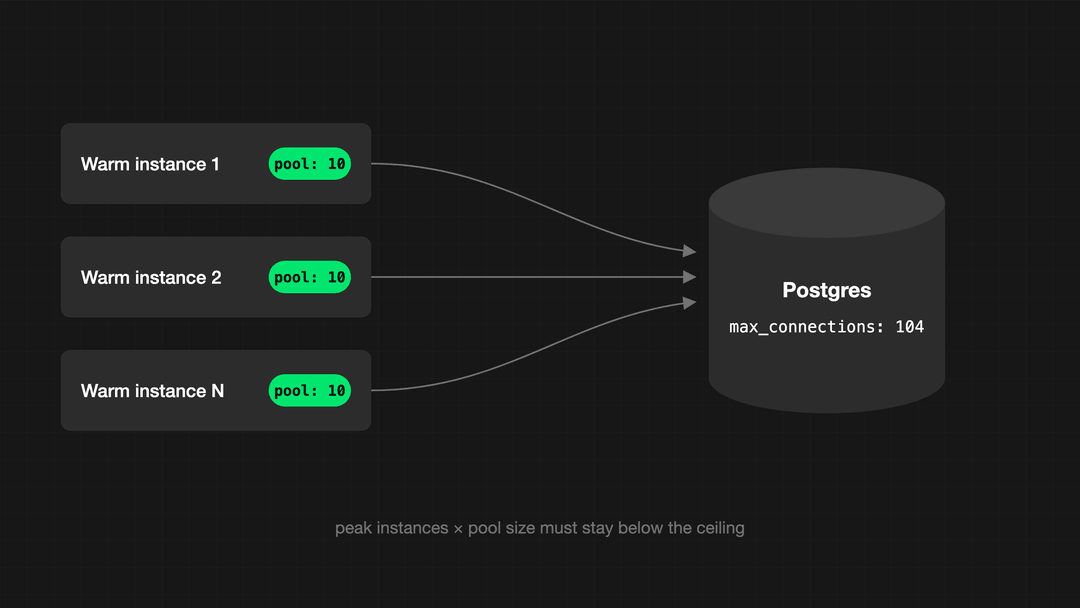 pool math connection ceiling
On Cloudflare the whole pattern inverts. A module-scope client breaks, because I/O objects belong to a single request and can’t be reused by the next one. Create the client inside fetch() and let Hyperdrive own the pool. How many sequential queries a request makes is the variable that decides whether that placement works for you.
4. Offloading long-running work
The first thing to internalize: after() and waitUntil buy you latency, not durability. The callback runs inside maxDuration, it doesn’t extend it. Vercel cancels pending deferred promises at timeout, and Cloudflare’s ctx.waitUntil extends an HTTP invocation by up to 30 seconds after the response, then cancels the rest.
The second thing: after() fires on failed requests too, including notFound() and redirect(). That’s why the gate in the snippet below exists.
import { after } from 'next/server';

export async function POST(req: Request) {

  const event = await verifyStripeSignature(req);

  // dedupe row and enqueue written in the same transaction

  const charged = await recordEventOnce(event.id);

  after(async () => {

    if (!charged) return;      // after() runs even when the request failed

    await trackUsage(event);   // shares the invocation budget, cancelled at timeout

  });

  return Response.json({ received: true });

}
For anything that must actually finish, pick the primitive by its unit of retry:
- Vercel Queues retries the whole message and has no built-in DLQ.
- Cloudflare Queues retries the whole batch unless you
ack()each message individually. - A step engine is the only option that can resume execution from the failed step. All of them deliver at‑least‑once, so mint an ID at publish time and reuse it as the idempotency key downstream. All of them deliver at-least-once, so mint an ID at publish time and reuse it as the idempotency key downstream.
5. Streaming responses
The mechanics are small: a ReadableStream in the Response body, text/event-stream makes it SSE, and cancel() is where you stop the producer.
export async function GET(req: Request) {

  const encoder = new TextEncoder();

  const events = subscribeToJobUpdates(req.signal);

  const stream = new ReadableStream({

    async pull(controller) {

      const { value, done } = await events.next();

      if (done) return controller.close();

      controller.enqueue(encoder.encode(`data: ${JSON.stringify(value)}\n\n`));

    },

    cancel() {

      events.return?.(); // client disconnected, stop producing

    },

  });

  return new Response(stream, {

    headers: {

      'Content-Type': 'text/event-stream',

      'Cache-Control': 'no-cache, no-transform',

    },

  });

}
The part that’s easy to get wrong isn’t the handler. Streaming is an end-to-end property, and the classic failure is a response that arrives all at once because a node in the middle buffered it. The usual suspects:
- an nginx-class proxy (send
X-Accel-Buffering: no) - a load balancer without chunked transfer encoding or HTTP/2
- an AWS ALB in front of a Lambda integration
Test with curl against the deployed URL before you touch the code.
Two more traps live on long streams. The duration limit is wall clock time, including bytes already sent, and because the status line leaves with the first byte, a mid-stream timeout reaches the client as a truncated body under the 2xx that already went out. And a client disconnect does not stop a Node function on Vercel until you set
"supportsCancellation": true. The ReadableStream constructor reference on MDN covers thepullandcancelcontract in depth.
Next.js Serverless Functions: Best Practices Checklist
- Trim cold starts at the bundle, not the runtime. Vercel packs routes into the minimum number of functions, so one heavy import taxes every route in that bundle. Use route-scoped
outputFileTracingExcludesandawait import()on rarely hit branches.next/dynamicis a client-bundle lever, so it’s not the tool here. - Design stateless. Fluid compute, Vercel’s model for sharing an instance across concurrent requests, shares an instance and its globals across concurrent invocations, so module scope holds immutable config and pools, nothing else. On Workers the rule inverts.
- Idempotency key on every webhook-backed function. Stripe can deliver the same event more than once, retries failures for up to three days in live mode, and guarantees no ordering. Answer 2xx before the heavy work, dedupe on the event id, and write the dedupe row in the same transaction as the enqueue.
- Externalize caching. Do not assume that a serverless function instance will stay alive or handle a fixed number of concurrent requests. Design critical workflows to work correctly even when an instance is replaced, scaled down, or restarted. On Vercel, inactive production functions can be archived after two weeks. The first request after that idle period may take at least one second longer while the function is restored. Validate at the boundary, authorize separately. Content type and size before parsing, media type instead of the raw header, and re-read the record with an ownership filter rather than trusting ids in the payload.
- Structured logs and one trace per invocation. Wire
onRequestErrorfrominstrumentation.tswith itsrouteType, and stampVERCEL_DEPLOYMENT_IDon every line. Logs cap at 256 lines and 1 MB per request, and past the cap only the most recent lines stay queryable. - Explicit timeouts, fail fast.
fetchon Node has no overall timeout. CombineAbortSignal.timeout()withrequest.signaland return your own 504 instead of letting the platform kill the invocation.
Common Next.js serverless function mistakes
| Pitfall | Symptom | Fix |
|---|---|---|
| New connection per invocation | too many connections at modest traffic |
Pool with min: 1, never max: 1, attachDatabasePool, transaction-mode pooler |
| Oversized bundle | Slow first hit on every route in the function, not just the guilty one | outputFileTracingExcludes, deep imports, await import() |
| Relying on in-memory cache | Hit rate varies by instance, values vanish after archiving | External store |
| Long synchronous task inside a request | Timeout, or a truncated stream under a 200 | Queue or step engine |
| No idempotency on retried webhooks | Duplicate charges and emails | Dedupe on event id in your own table, since Stripe can drop its key after 24 hours |
| Mutable module-scope state under in-function concurrency | One request reads another’s data | Module scope holds config and pools only |
Next.js Migration Checklist for Product Teams
A successful migration from a legacy website to Next.js is more than a frontend rebuild. Before launch, product, marketing, and engineering teams should confirm that the new website supports critical customer journeys, integrations, content workflows, and operational requirements.
- Audit legacy APIs and third-party integrations, including forms, CRM systems, payment providers, analytics, search, email platforms, and customer-data tools.
- Separate work that must happen while a visitor waits, such as authentication, pricing, stock checks, and form confirmation, from background work such as notifications, CRM synchronisation, file processing, and reporting.
- Test business-critical journeys end to end, including forms, checkout, login, account actions, password resets, webhooks, CMS previews, redirects, and error states.
- Confirm hosting, runtime, and deployment compatibility for the chosen infrastructure, especially if the website relies on Vercel, Cloudflare, Netlify, AWS, self-hosting, or legacy middleware.
- Validate production performance, caching, error handling, monitoring, logging, uptime expectations, and rollback procedures before launch.
- Define ownership for post-launch support, including who monitors failures, handles failed webhook deliveries, updates dependencies, and responds to performance regressions.
- Confirm that marketing teams can manage content, metadata, redirects, structured data, localisation, analytics, and conversion tracking without requiring unnecessary developer involvement.
Build Reliable Next.js Serverless Functions
The central rule for reliable Next.js serverless functions is simple: treat every function instance as temporary. A serverless instance can be replaced, paused, scaled, or retried at any time, so critical data and work should not depend on in-memory state or a single request completing successfully. Build handlers to be stateless, use database connection pools safely, make webhook processing idempotent, move long-running work into queues or durable workflows, and test streaming in the deployed environment. These Next.js serverless function best practices help teams create faster, more resilient websites that can scale without introducing duplicate actions, failed integrations, database bottlenecks, or unreliable background tasks. If you are migrating a legacy website to Next.js, or improving an existing application with fragile APIs, serverless functions, or third-party integrations, our Next.js migration and development team can help. Start a conversation to discuss your current architecture, the risks worth addressing first, and whether FocusReactive is the right fit for your project.







.png&w=828&q=90)
.jpg&w=64&q=90)