

Quick Answer
Choose Storyblok if:
- Your editors need drag-and-drop visual page building
- You run content across multiple languages and regions and want it ready on day one
- You want a fully managed SaaS platform with no hosting to run
Choose Payload CMS if:
- You want the CMS inside your own Next.js codebase and infrastructure
- Custom workflows, access rules, and business logic are critical
- You have developers who can own setup and hosting
| Best for | Pick |
|---|---|
| Marketers | Storyblok |
| Developer-led teams | Payload CMS |
| Enterprise customization | Payload CMS |
| Fast editorial adoption | Storyblok |
Storyblok and Payload CMS are both popular headless CMS platforms, but they take very different approaches to content management, customization, and team workflows. Storyblok is a managed SaaS platform built around visual editing. Payload is an open-source, code-first CMS that installs directly into a Next.js app. Here’s how they compare on the factors that matter most to marketing and digital teams.
This comparison is based on FocusReactive’s experience implementing, migrating, and supporting headless CMS platforms for enterprise content teams, ecommerce brands, and multi-market organizations. FocusReactive is a certified partner of both Storyblok and Payload. We evaluated both platforms across:
-
Editorial workflows
-
Infrastructure and hosting
-
Localization and multi-tenancy
-
Integrations and custom workflows
-
Pricing and total cost of ownership
-
Marketing and engineering collaboration
Storyblok vs Payload CMS for Editorial Workflows
Storyblok CMS
- Offers a Visual Editor out of the box — you see what the page looks like while editing.
- Ideal for teams who want to work visually without involving developers for every change.
- Uses a component-based content structure, which fits modern design systems but might require onboarding.
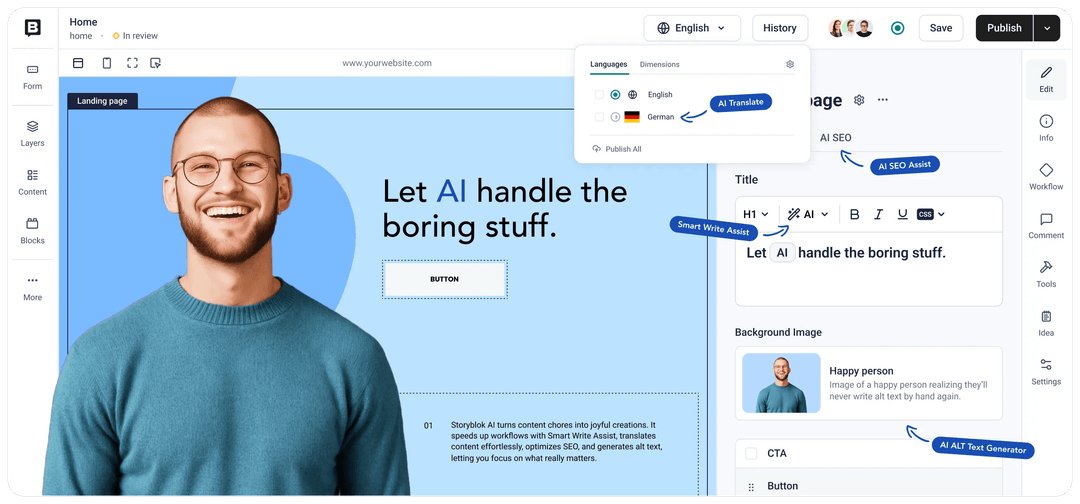 Storyblok visual editor
Payload CMS
- Clean, fast form-based admin interface designed for structured content and developer-led workflows.
- Live Preview lets editors see how content will appear on the front end while editing.
- A Visual Editor is available as an Enterprise feature.
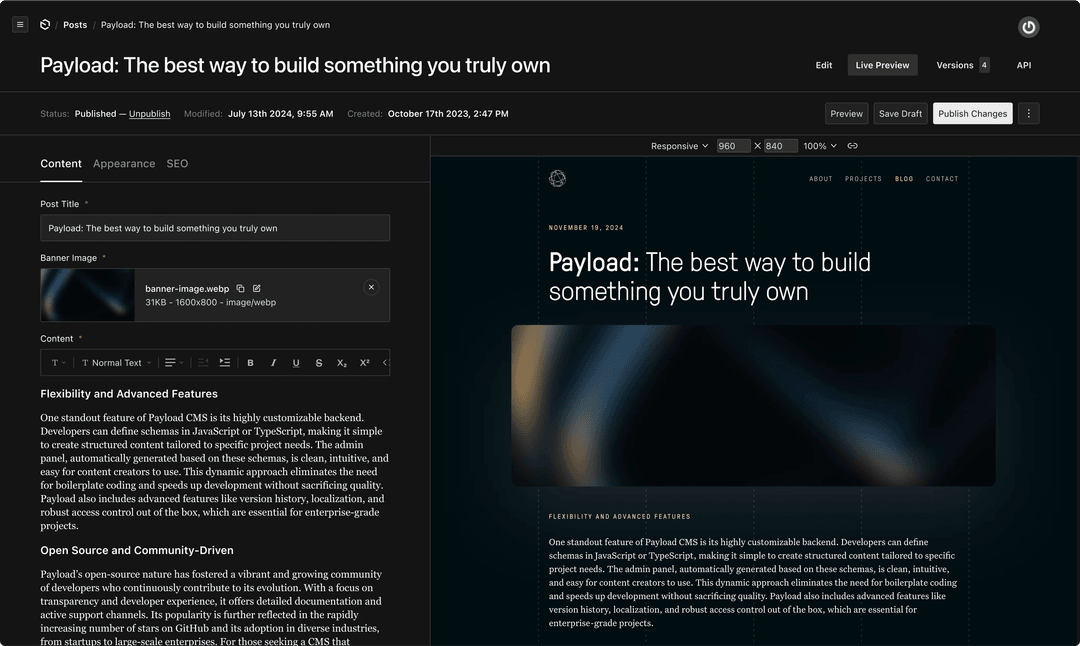 Payload CMS editor
Verdict
Storyblok wins for visual page building out of the box. Payload is stronger when developers need to customize the editing experience and content workflows.
Who Owns Your Stack: SaaS Convenience vs Infrastructure Control
Storyblok CMS
- SaaS platform (fully managed by Storyblok).
- Convenient, but limited control over infrastructure and data.
Payload CMS
- Self-hosted or deployable anywhere (e.g., Vercel, Render, private cloud).
- Full control over data, logic, and security policies.
Verdict: Payload is better suited to teams that need greater control over infrastructure, data, deployment, and security policies. Self-hosting gives Payload users more control over infrastructure, deployment, and data, but that doesn’t automatically make it a better high-compliance solution. Compliance depends on the actual architecture, controls, hosting provider, processes, etc.
CMS Localization for Multi-Market Teams
Storyblok CMS
-
Multi-language and multi-space features come built in.
-
Switching locales and duplicating content for regional teams is easy.
-
Storyblok is easier for regional marketing teams on day one. Payload’s localization is just as capable and more precise, but a developer needs to set it up once.
Payload CMS
-
Localization works field by field. For example, you can translate a headline while keeping one shared product SKU across languages.
-
It includes fallback locales, right-to-left language support, and limits on which locales each user or tenant sees.
-
The official multi-tenant plugin adds a tenant switcher to the admin panel, filters content by tenant, and blocks users from writing to tenants they don’t belong to.
-
Switching an existing field to localized changes how its data is stored, so plan a migration first.
Verdict: Storyblok is easier for regional marketing teams to start using. Payload provides granular localization controls, but developers need to configure them.
Integrations, APIs, and Custom Workflows
Storyblok CMS
- Content Delivery and Management APIs, webhooks, and ready-made integrations with tools like Shopify, Algolia, and Netlify.
- Custom field plugins and extensions are available. Backend logic is limited because it’s a SaaS platform.
Payload CMS
- REST and GraphQL APIs are generated automatically, plus a Local API for direct server-side queries.
- Hooks at the collection and field level run your own logic on create, update, or delete, for example syncing to a CRM, triggering builds, or calling third-party APIs.
- Official plugins cover search, SEO, redirects, form builder, Stripe, nested documents, and multi-tenancy.
- The Enterprise tier adds SSO (SAML / OAuth 2.0), audit logs, A/B variant testing, and AI features: translation, writing assistance, and auto-embedding for retrieval-augmented generation (RAG).
Verdict: provides managed workflow capabilities within the platform, while Payload gives developers deeper control to implement custom business logic and integrations.
For a practical example of how we structure large Storyblok implementations, see our guide to reusable Storyblok blocks, adapters, and scalable content architecture, where we cover the pattern used on a production website with 77 section types.
Which CMS Works Better for Marketing and Engineering Collaboration
Storyblok CMS
- APIs and SDKs for modern front-end frameworks.
- Devs and marketers can work in parallel, though backend customizations are limited.
Payload CMS
- Built for dev-first teams.
- Full customization of content types, logic, and publishing flows.
Verdict:
Payload is ideal for teams where marketing and engineering closely collaborate.
CMS Pricing Compared: Storyblok Subscription Costs vs Payload Ownership Costs
How to think about TCO
-
Storyblok costs are easier to forecast, because one subscription covers the platform and its operations.
-
usually costs less over time for teams that already have Next.js and DevOps skills, because you pay for infrastructure rather than seats. Teams without in-house developers should budget for implementation and maintenance.
Pricing reflects publicly available information as of October 2026 and may change. Check the official Storyblok and Payload pricing pages for current details.
Verdict: Storyblok offers a predictable managed cost. Payload offers the lowest license cost and the most room to optimize, if you can run it yourself.
 cms pricing
Storyblok CMS
Storyblok uses a managed SaaS pricing model that includes hosting, platform maintenance, and infrastructure management. Costs can increase as teams need more seats, traffic, API requests, locales, or advanced features.
Payload CMS
Payload is open source and MIT licensed, with free self-hosting. Enterprise features and support are available for organizations with advanced requirements. Self-hosting adds infrastructure and maintenance costs, but gives teams greater control over their hosting environment and deployment choices.
What This Means for Total Cost of Ownership
Storyblok has a more predictable operational cost because hosting and platform management are included in the SaaS subscription. Payload can reduce licensing costs for teams that already have the engineering and DevOps resources to run it, but those teams need to account for infrastructure, implementation, and maintenance.
Storyblok vs Payload CMS: Side-by-Side Comparison
| Criteria | Storyblok | Payload CMS |
|---|---|---|
| Visual editing | ✅ Built-in | ✅ Enterprise Visual Editor |
| Live preview | ✅ | ✅ |
| Hosting | Managed SaaS | Self-hosted / Enterprise hosting |
| Localization | ✅ Built-in | ✅ Built-in, developer-configured |
| Custom workflows | ✅ Standard; custom on higher tiers | ✅ Highly extensible |
| Infrastructure control | Limited | High |
| Pricing model | SaaS subscription | Open source + infrastructure / Enterprise |
| Best fit | Marketing-led teams | Developer-led teams |
What Figma’s Acquisition Means for Payload CMS Figma acquired Payload in June 2025
Figma acquired Payload in June 2025. For teams evaluating Payload today, here’s what has changed and what hasn’t. (For more on Payload’s architecture and roadmap, see our Payload CMS overview.)
-
Payload remains open source. …
-
Self-hosting is unchanged. …
-
Payload Cloud is paused for new projects. …
-
The product direction is design-to-code. …
As CMSWire notes, the long-term picture will depend on how Figma handles governance, pricing, and feature access.
- Payload remains open source.
The core stays MIT-licensed and free for commercial use, and Figma has committed to keep investing in it.
- Self-hosting is unchanged.
Payload still deploys anywhere that runs Next.js, including Vercel, your own cloud account, or private infrastructure.
-
Payload Cloud is paused for new projects. Existing Cloud projects keep running, but new deployments are on hold while a new hosting option is developed.
-
The product direction is design-to-code. Both companies describe the goal as closing the gap between design and code. That points to tighter links between Figma design systems and the CMS.
What this means for buyers: Payload has a large, well-funded company behind it, which reduces long-term vendor risk for an open-source CMS. The trade-off is that managed hosting isn’t currently available, so new Payload projects need a self-hosting plan from day one.
How FocusReactive Helps Teams Choose and Implement the Right Headless CMS
Storyblok or Payload CMS: Which Should You Choose?
Payload and Storyblok are both strong headless CMS platforms, but they solve different problems. Storyblok excels for teams that prioritize visual editing and a managed SaaS experience. Payload offers greater flexibility, ownership, and developer control. The right choice depends on your content model, team structure, compliance requirements, and long-term digital strategy.
Choose Storyblok if your team looks like this
-
Marketers own the website and need to build and launch pages without waiting on developers
-
You manage content across several languages, regions, or brands and want that structure ready from day one
-
You’d rather pay a predictable subscription than run hosting, updates, and infrastructure yourself
-
Your developer capacity is limited or focused on the front end
Choose Payload CMS if your team looks like this
-
Your website or product is built on Next.js and you want the CMS in the same codebase
-
You need custom workflows, access rules, or business logic that a SaaS platform can’t support
-
Data ownership and control over where content is hosted are requirements, not preferences
-
You have developers who can own setup, hosting, and ongoing maintenance
Questions to answer before you decide
-
Who will edit content day to day: marketers, developers, or both? This usually decides between visual page building and a form-based admin.
-
How many locales, regions, or brands do you need to support? Both platforms handle localization, but setup effort differs.
-
Do you have compliance or data residency requirements? Self-hosting gives you more control, but compliance still depends on your architecture and processes.
-
Which costs more for your team: seats or engineering time? Storyblok scales with seats and usage. Payload scales with infrastructure and developer hours.
-
What integrations does your CMS need to drive? For example a CRM, ecommerce, search, or internal tools.
If you’re migrating from another CMS, factor in content modeling and migration effort as well. Moving to either platform means restructuring your content, not just exporting it.
How FocusReactive helps
At FocusReactive, we help organizations evaluate, implement, and scale the CMS that best fits their real-world content and marketing workflows. As a certified partner of both platforms, we work as a Storyblok expert agency for marketing-led teams and a Payload CMS development agency for developer-led builds, and we support other headless CMS platforms too.
We typically help with:
-
CMS selection: mapping your content model, team workflows, and technical constraints to the right platform
-
Implementation: building Next.js websites with Storyblok or Payload, including component libraries, localization, and integrations
-
Migration: moving content from legacy or SaaS CMS platforms with a structured content model and minimal downtime
-
Ongoing support: performance, technical SEO, and scaling as your content operations grow
Not sure which platform fits? Tell us about your team, content, and stack, and we’ll give you a recommendation based on your actual setup.
📩 Want to discuss your CMS setup? Let’s talk.


 Aleksei Zhilyuk
.jpg&w=64&q=90)
.png&w=828&q=90)




%2520(1).png&w=828&q=90)
